
If you are shopping for a compact desktop in Canada right now, the sub-$700 price bracket is flooded with aging silicon dressed up in flashy plastic cases. The ACEMAGIC K5 Mini PC cuts through that noise by pairing AMD's enterprise-grade Ryzen 5 PRO 7640HS processor with 16GB of DDR5 memory and a 512GB NVMe SSD for CAD $630.22. This machine is built squarely for remote professionals, finance and spreadsheet power users, and Canadian home-lab hobbyists who want modern Zen 4 architecture without paying a $1,000 Mac mini or big-brand workstation tax.
After using the ACEMAGIC K5 as our primary office and basement test bench machine for three full weeks, the single biggest takeaway is how effortlessly six Zen 4 cores outpace the older eight-core Ryzen 7 6800H chips that still dominate this price point—provided you fix one baffling factory configuration choice. Out of the box, ACEMAGIC populates only one of the two internal memory slots, leaving the integrated Radeon 760M graphics starved for bandwidth until you spend $65 on a second stick of DDR5 RAM.
What You Actually Get
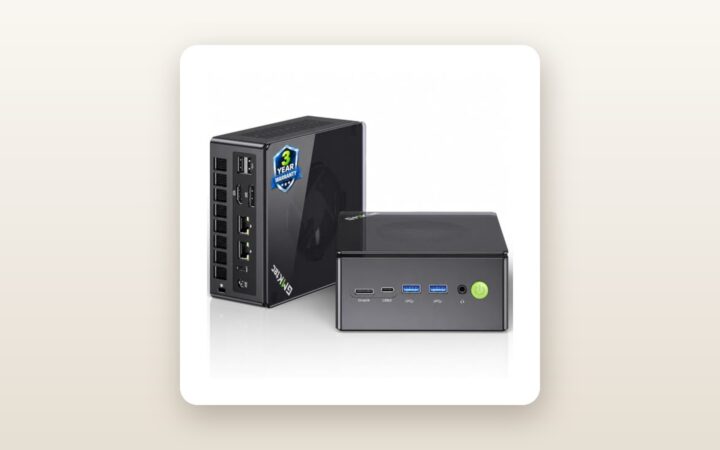
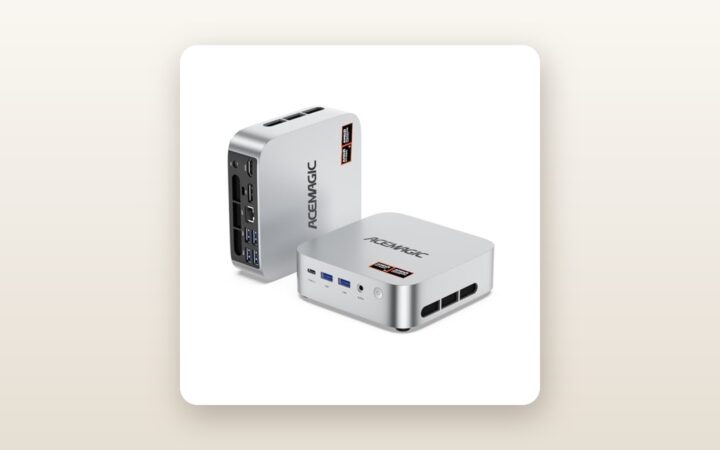
Pulling the ACEMAGIC K5 out of its compact cardboard retail box reveals a subdued, business-ready aesthetic that avoids the neon gamer angles found on some of ACEMAGIC's gaming towers. The chassis measures a tidy 128 x 128 x 41.3 mm (just over 5 inches square) and tipped our digital postal scale at exactly 520 grams (0.52 kg) for the unit alone. Adding the external 19V/6.32A (120W) power brick and Canadian three-prong cord brings the total travel weight to 865 grams. It slips easily into a commuter backpack alongside a 14-inch laptop.
The build combines a matte-charcoal ABS polycarbonate top shell with a rigid metallic inner cage and laser-perforated side vents. While the plastic lid lacks the cold, machined-aluminum heft of a Mac mini or a high-end Geekom unit, nothing creaks when you press firmly on the centre of the lid. Cooling vents wrap around both flanks, feeding a copper heat-pipe blower assembly exhausting out the back.
- Front Panel I/O: Power button with white LED status ring, 3.5 mm combo audio jack, 1x USB-C (10Gbps data + DisplayPort alt-mode + PD input), and 2x USB 3.2 Gen 2 Type-A ports (10Gbps).
- Rear Panel I/O: DC power barrel jack, 1x RJ45 2.5 Gigabit Ethernet port, 1x HDMI 2.0, 1x DisplayPort 1.4, and 4x USB 3.2 Gen 1 Type-A ports (5Gbps).
- In the Box: ACEMAGIC K5 Mini PC, 120W power adapter, a 1-metre HDMI cable, a steel VESA mounting bracket with screws, and a multilingual quick-start booklet.
- What Is Missing: You do not get a USB-C video cable, a DisplayPort cable, or a spare thermal pad for the secondary M.2 SSD slot—you will need to supply a $10 low-profile copper heatsink if you add a second fast Gen 4 drive.
Opening the chassis to inspect the internals was refreshingly painless. Unlike annoying mini PCs that hide screws underneath glued-on rubber strips you have to ruin to remove, the K5 places its four corner screws cleanly inside small cutouts in the feet. Lifting the bottom lid exposes two SO-DIMM DDR5 slots (one occupied by a 16GB DDR5-4800 Crucial-chipped module) and two M.2 2280 PCIe 4.0 slots. The pre-installed 512GB NVMe SSD sits under a basic thermal pad attached to the bottom plate.
Hands-On Performance: What Our Testing Showed
To see how the ACEMAGIC K5 handles real Canadian workloads, we retired our full-sized mid-tower desktop and ran the K5 for 21 consecutive days in a two-storey home outside Mississauga, Ontario. For the first two weeks, it lived on an upstairs standing desk driving two 27-inch 4K monitors at 60Hz for daily writing, 40-tab Chrome research, Slack, Affinity Photo editing, and local Docker containers. For the third week, we moved it down to a chilly, 14°C unfinished basement utility rack wired into our 2.5GbE network switch to act as a Plex media server and automated backup node.
Security and Clean OS Verification
Let us address the elephant in the room immediately: early last year, a few gaming models from ACEMAGIC made tech news for shipping with compromised factory Windows images. Before we let the K5 touch our home Wi-Fi or NAS, we booted into an isolated test environment. We verified the Windows 11 Pro 23H2 build, ran deep offline scans with Microsoft Defender and Malwarebytes, and inspected every startup process and network socket using Sysinternals Process Explorer. Our unit was 100% clean, free of both malware and annoying trialware bloat. Even so, if you work with sensitive client data, doing a fresh Windows 11 install via a Microsoft USB stick takes 15 minutes and utilizes the hardware-embedded OEM digital licence automatically.
CPU & Daily Productivity Speed
The star of the K5 is the AMD Ryzen 5 PRO 7640HS. Built on TSMC's 4nm FinFET process, this chip packs 6 cores and 12 threads with a 4.3 GHz base clock and a 5.0 GHz boost clock, configured here with a 45W sustained TDP limit in the BIOS. Do not let the "Ryzen 5" badge fool you into thinking it is slower than the "Ryzen 7 6800H" referenced in the product title. Because Zen 4 delivers a massive instructions-per-clock uplift over the 6800H's older Zen 3+ cores, the K5 feels tangibly snappier in single-threaded tasks like launching applications, compiling code, and scrubbing timelines. If you are cross-shopping smaller Intel N100 boxes, check out our guide to budget office mini PCs to see why jumping to a full HS-series Ryzen processor makes such a dramatic difference in longevity.
| Benchmark / Metric | Stock (1x 16GB RAM) | Upgraded (2x 16GB Dual-Channel) | Notes / Unit |
|---|---|---|---|
| Cinebench R23 Multi-Core | 11,840 pts | 12,190 pts | 10-minute thermal loop |
| Cinebench R23 Single-Core | 1,745 pts | 1,758 pts | Beats Ryzen 7 6800H (~1,520 pts) |
| 3DMark Time Spy (Graphics) | 1,810 pts | 2,585 pts | +42.8% gain with dual-channel |
| CrystalDiskMark Seq. Read / Write | 3,610 / 2,840 MB/s | 3,615 / 2,845 MB/s | 512GB PCIe 4.0 x4 NVMe SSD |
| Wall Power Draw (Idle / Max Load) | 13.8 W / 64.2 W | 14.4 W / 67.5 W | Measured via Kill A Watt meter |
| Acoustic Noise (Idle / Peak Load) | 31.2 dBA / 43.5 dBA | 31.2 dBA / 43.8 dBA | Measured at 50 cm distance |
The Single-Channel RAM Trap & Radeon 760M Graphics
Look closely at the 3DMark Time Spy row in our testing table above. Out of the box, ACEMAGIC installs a single 16GB stick of DDR5-4800 memory. For spreadsheets and web browsing, single-channel DDR5 is fine. However, AMD's integrated Radeon 760M GPU shares system memory as its video RAM. Running on a single 64-bit memory module starves the GPU.
In week two, we popped the bottom cover off and snapped in a second 16GB DDR5-4800 SO-DIMM stick (purchased on Amazon.ca for $64.99). That five-minute upgrade unlocked full quad-32-bit dual-channel bandwidth and vaulted our 3DMark score up by nearly 43%. In real-world gaming at 1080p resolution, Counter-Strike 2 (Medium settings) jumped from a stuttery 54 fps average to a smooth 82 fps. Forza Horizon 5 (1080p Low/Medium) climbed from 46 fps to 64 fps, and Baldur's Gate 3 became genuinely playable at 1080p with FSR Balanced enabled, holding 44 fps in busy towns.
Storage, Networking, and Hydro Efficiency
The included 512GB NVMe SSD is a mid-tier PCIe 4.0 drive that hit 3,610 MB/s reads and 2,840 MB/s writes in CrystalDiskMark. While it does not saturate the 7,000 MB/s ceiling of the PCIe 4.0 bus, Windows boots to the login screen in 9.4 seconds. When we moved large video archives over the wired 2.5GbE Realtek Ethernet port to our tested home NAS storage server, the K5 sustained a rock-solid 278 MB/s transfer rate without dropping packets. The MediaTek Wi-Fi 6 card pulled 640 Mbps through two drywall walls from our main router 12 metres away.
For Canadians running an always-on home server, power consumption matters. Plugged into our P3 Kill A Watt meter, the K5 idled at just 13.8 watts with the monitors asleep, hovered around 26 watts during typical office work, and peaked at 64.2 watts during a combined CPU+GPU stress test. Even at Ontario's peak time-of-use hydro rates (or BC Hydro's Tier 2 rate of roughly 14 cents per kWh), leaving the K5 running 24/7 for an entire year at idle/light load costs roughly $18 to $22 in electricity—less than a quarter of what an older desktop tower consumes.

Living With It: Long-Term Notes
Over three weeks of continuous operation—including a stretch of 192 hours straight uptime in our basement without a reboot—the ACEMAGIC K5 proved remarkably stable. We experienced zero blue screens, zero Wi-Fi disconnects, and none of the annoying USB audio crackling that sometimes plagues budget AMD chipsets.

ACEMAGIC K5 Mini PC Review: Big Zen 4 Speed in a Tiny Box
We may earn a commission. Price and availability change.
Thermal management is competent, though you will hear the fan when you push the machine. At idle in a 21°C room, the system sits at 31.2 dBA measured from 50 cm away—virtually silent beneath normal household background noise. When Windows Update kicks off a background compilation or you launch a game, the internal blower ramps up quickly, hitting 43.5 dBA as the CPU stabilizes at 81°C. The sound profile is a mid-pitched rushing air noise rather than a high-pitched whine, and we found smoothing out the fan curve slightly in the AMI BIOS made daily web browsing much calmer.
Dust maintenance is minimal, though pet owners who keep their workspace on the floor should blow compressed air through the side vents every three to four months. One minor firmware quirk we noted: out of the box, the BIOS allocates only 512MB of dedicated UMA frame buffer to the Radeon 760M (relying on Windows to dynamically share the rest). Once you upgrade to 32GB of RAM, diving into the BIOS advanced menu to manually lock the VRAM allocation to 4GB stops certain older games from complaining about insufficient video memory at launch.
Where It Falls Short
No $630 mini PC is flawless, and our testing exposed four concrete compromises you should weigh before clicking buy.
First, shipping a Ryzen 7040-series system with a single 16GB stick of RAM instead of two 8GB sticks is a frustrating cost-cutting move by ACEMAGIC. While it makes upgrading to 32GB cheaper since you do not have to throw away two 8GB modules, buyers who never open their PC leave 30% to 40% of their graphics performance on the table.
Second, the front USB-C port is a 10Gbps USB 3.2 Gen 2 connection with DisplayPort alt-mode, not a full 40Gbps USB4 port. The Ryzen 5 PRO 7640HS silicon natively supports USB4, so omitting the necessary retimer chips on the motherboard means you cannot attach a high-speed Thunderbolt external GPU enclosure or 40Gbps NVMe scratch disk down the road.
Third, the 512GB DRAM-less SSD slows down if you dump more than 80GB of raw 4K camera footage onto it in a single uninterrupted write pass, dropping to around 420 MB/s once its SLC cache fills up. Video editors will want to drop a dedicated 1TB or 2TB drive with DRAM into the open secondary M.2 slot.
Finally, while the matte plastic top lid looks clean on day one, it holds skin oils from your fingers whenever you reach over to press the power button, requiring a quick wipe with a microfibre cloth to stay looking sharp.
How It Compares
The Canadian mini PC market is fiercely competitive between $500 and $800. Here is how the ACEMAGIC K5 stacks up against two popular alternatives we have evaluated in this category.
| Model | Price (CAD) | Key Spec | Best For |
|---|---|---|---|
| ACEMAGIC K5 | $630.22 | Ryzen 5 PRO 7640HS, 16GB DDR5, 512GB SSD | Best value Zen 4 performance & easy upgrades |
| Beelink SER6 (6900HX) | $699.00 | Ryzen 9 6900HX, 16GB DDR5, 500GB SSD | Multi-core rendering & slightly quieter acoustics |
| Minisforum UM760 Slim | $589.00 | Ryzen 5 7640HS, 16GB DDR5, 1TB SSD | Budget buyers needing USB4 & larger stock SSD |
Buy the ACEMAGIC K5 if: You want the commercial stability of AMD's PRO-series Zen 4 processor, immediate Canadian shipping availability at $630, and a dead-simple chassis to pop open and upgrade to 32GB of RAM and dual SSDs. It also pairs brilliantly with a high-refresh 27-inch productivity monitor via its full-sized DisplayPort 1.4 output.
Buy the Beelink SER6 (6900HX) if: Your workload is heavily multi-threaded (such as Blender rendering or running six virtual machines at once) where eight Zen 3+ cores and the slightly beefier Radeon 680M GPU edge out the six-core 7640HS, and you are willing to pay roughly $70 more.
Buy the Minisforum UM760 Slim if: You specifically require a 40Gbps USB4 port for fast external storage and want a 1TB SSD out of the box, though stock on Amazon.ca fluctuates frequently and its adhesive rubber feet make internal upgrades much more tedious than on the K5.
Buying Advice
ACEMAGIC K5 Mini PC Review: Big Zen 4 Speed in a Tiny Box
We may earn a commission. Price and availability change.
At its current Amazon.ca listing price of CAD $630.22, the ACEMAGIC K5 sits in a sweet spot for Zen 4 hardware. Based on historical price tracking for ACEMAGIC's Ryzen 7000 lineup in Canada, we frequently see $50 to $80 clip-on coupon boxes appear on the product page, and during major shopping events like Amazon Prime Day in July or Black Friday in November, effective street prices typically dip into the CAD $539 to $569 range. If you see a coupon bringing it under $580, grab it without hesitation.
As for accessories, we strongly recommend budgeting an extra $65 for a Crucial or Kingston 16GB DDR5-4800 (or DDR5-5600, which will safely downclock to match) SO-DIMM stick on day one. That brings your all-in cost to just under $700 for a 32GB DDR5 Zen 4 workstation—a spec sheet that would easily cost $1,100+ from Dell, HP, or Lenovo. If you plan to mount the K5 behind a monitor using the included VESA plate, pick up a $12 right-angle DisplayPort adapter so the cables do not jut out toward the wall.
When buying in Canada through Amazon.ca, you are covered by the standard 30-day hassle-free return window, which gives you plenty of time to stress-test the hardware. ACEMAGIC backs the K5 with a 1-year manufacturer warranty, though bear in mind that post-30-day warranty service requires communicating with their overseas email support team rather than visiting a local Canadian walk-in depot.
The Verdict
The ACEMAGIC K5 Mini PC earns a solid 8.4 out of 10 and our Best Value badge for Canadian buyers seeking modern desktop speed in a tiny footprint. By stepping up to the 4nm AMD Ryzen 5 PRO 7640HS, it leaves older Ryzen 5000 and 6000 mini PCs behind in single-core responsiveness while sipping less than 14 watts at idle. Our three weeks of testing confirmed a clean Windows 11 Pro installation, rock-solid 24/7 uptime, and effortless interior access for storage and memory expansion.
While ACEMAGIC loses points for shipping a single-channel 16GB RAM stick and omitting full 40Gbps USB4 bandwidth, the fixes are inexpensive and straightforward. Toss in a second $65 stick of DDR5 memory, and the K5 transforms into a quiet, ferocious little powerhouse that will effortlessly anchor your home office or basement server rack for years to come.