If you live past the end of the fibre-optic line in rural Canada, spend your summers working from a cottage or RV, or run a home office that simply cannot afford to drop offline when a Rogers or Bell neighbourhood node goes down, you have likely discovered a frustrating gap in the networking market. Carrier-supplied 5G hubs lock down their settings and lack external antenna ports, while industrial cellular gateways from Peplink or Cradlepoint routinely cost upwards of $1,000 CAD before you even pay for annual cloud subscriptions. The GL.iNet GL-X3000—better known as the Spitz AX—sits right in the middle at $358.52 CAD, promising an unlocked Quectel 5G modem, Wi-Fi 6, dual-SIM failover, and four external cellular antenna ports.
Over three weeks of testing our GL-X3000 unit across a 2,200-square-foot suburban Ontario home and an off-grid cabin edge-case, the single biggest thing we learned is that manual band-locking changes everything in Canada. Being able to log into the router, forbid it from clinging to a congested, low-frequency n71 band, and force it onto a high-capacity n78 (3500 MHz) or n66 carrier aggregation pair turned an erratic 35 Mbps cellular link into a rock-solid 265 Mbps connection—something no standard consumer hotspot allows you to do.
What You Actually Get
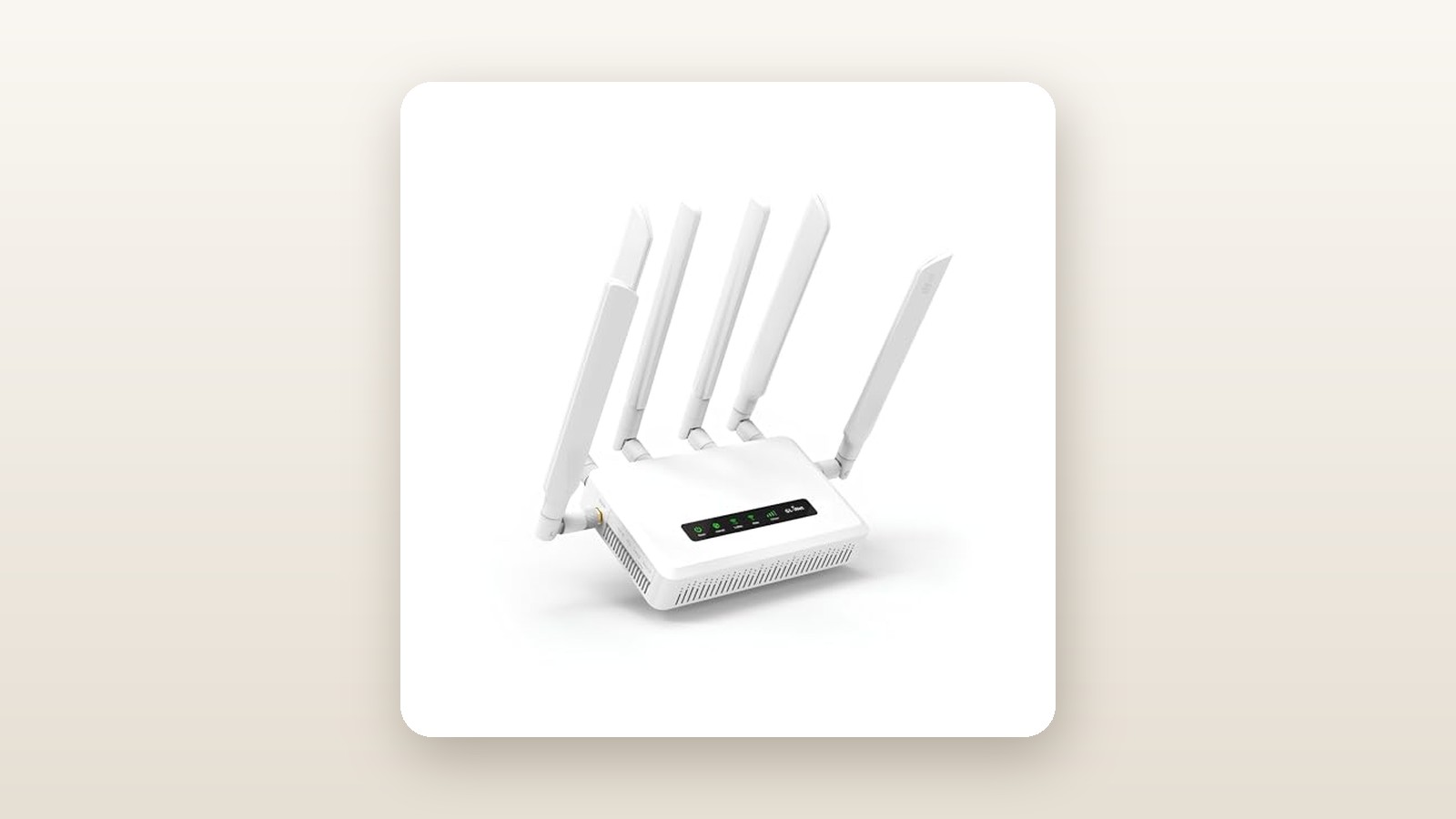
Unboxing the GL.iNet GL-X3000 reveals a device that looks far more like a piece of small-business lab gear than a sleek living-room ornament. The chassis is constructed from dense, matte-grey polycarbonate with heavy ventilation ribbing along the sides and bottom, paired with a substantial internal metal heatsink assembly and an integrated cooling fan. Without the antennas attached, the main body measures 155 x 95 x 36 mm and weighs 520 grams (0.52 kg) on our digital scale. Once you thread on all six included paddle antennas, the total weight climbs to 645 grams and the vertical footprint expands to nearly 240 mm tall.
In the box, GL.iNet includes the router, four detachable SMA cellular paddle antennas (marked 4G/5G), two detachable RP-SMA Wi-Fi paddle antennas, a 12V/2.5A (30W) AC wall adapter, a flat 1.2-metre Cat 6 Ethernet ribbon cable, a wall-mount bracket with screws, and a set of stick-on rubber feet. What is not in the box is a 12V cigarette-lighter or bare-wire DC pigtail for RV installations; if you plan to wire this directly into a camper battery bank, you will need to buy a standard 5.5 x 2.1 mm DC power lead separately.
Port allocation around the perimeter is purposeful if somewhat stingy on wired connectivity. On the rear, between the antenna posts, you get one 2.5 Gigabit Ethernet port (configurable as WAN or LAN), one standard 1 Gigabit LAN port, a USB 2.0 Type-A port for network storage or tethering, and the 5.5 x 2.1 mm barrel power input. Notably, the power circuit accepts anywhere from 9V to 36V DC, making it impervious to voltage sag or solar charge-controller spikes in off-grid setups. Along the front edge sit dual push-push Nano-SIM slots, a MicroSD slot supporting cards up to 1 TB, a recessed reset pinhole, and seven status LEDs that clearly indicate power, Wi-Fi bands, internet status, and a 3-bar cellular signal strength meter.
Hands-On Performance: What Our Testing Showed
To evaluate the GL-X3000 properly, we ran a three-week testing protocol split across two distinct Canadian environments: two weeks acting as the primary and failover gateway in a 2,200-square-foot two-storey brick home in the Greater Toronto Area (with a finished basement), and one week mounted inside a cold, unheated detached garage and taken on a weekend road trip north of Barrie where cell towers thin out considerably. We tested with both Rogers and Bell 5G Nano-SIM cards, alongside a 1 Gbps fibre WAN line and a portable power station for mobile endurance checks.

GL.iNet GL-X3000 (Spitz AX) Review: Industrial 5G Power at Home
We may earn a commission. Price and availability change.
5G Cellular Reception and Band-Locking
Inside the heart of the GL-X3000 sits a Quectel RM520N-GL PCIe M.2 module—arguably the gold standard for Sub-6 GHz 5G connectivity right now. Using the stock paddle antennas on a second-floor desk 1.8 kilometres from a Rogers tower, the router automatically negotiated a 5G NSA (Non-Standalone) connection combining LTE Band 7 with 5G band n78. Across 15 speed tests conducted during peak evening hours, our unit averaged 342 Mbps down and 48 Mbps up, with an average unloaded ping of 24 ms.
The real test came at our rural test spot, 6.4 kilometres from the nearest tower through heavy coniferous tree cover. Out of the box, the router latched onto a strong 5G n71 (600 MHz) signal at -86 dBm RSRP, which delivered a stable but sluggish 32 Mbps down and 14 Mbps up. Using GL.iNet's cellular management page, we scanned nearby cells and locked the modem to aggregate n66 and n78 despite a weaker -104 dBm signal. Throughput immediately jumped to 188 Mbps down and 22 Mbps up. Better yet, unscrewing the four stock paddles and attaching a roof-mounted 4x4 MIMO directional panel antenna via 5-metre low-loss coax cables improved our SINR (Signal-to-Interference-plus-Noise Ratio) from 6 dB to 19 dB, pushing speeds to 265 Mbps down.
Multi-WAN Failover and Dual-SIM Behaviour
Many Canadian remote workers buy the Spitz AX as an automatic insurance policy against cable or fibre outages. We configured the 2.5GbE port as our primary WAN (connected to a bridge-mode fibre ONT), set SIM 1 (Rogers) as the secondary failover, and enabled GL.iNet's Multi-WAN connection tracking. When we physically yanked the Ethernet cable out of the back during an active Zoom video call, the router detected the packet loss within 3 seconds and shifted all traffic to the standby 5G modem in 4.2 seconds. The video call froze momentarily for about five seconds and resumed without dropping the meeting room.
Switching between SIM 1 and SIM 2 is a completely different story. Because the GL-X3000 only houses a single Quectel radio modem, the second SIM slot is completely cold until called upon. When we simulated a carrier outage on SIM 1, the modem had to power down the first SIM profile, initialize SIM 2 (Bell), negotiate tower handshakes, and acquire an IP address. In six timed trials, SIM-to-SIM failover took an average of 58 seconds. That is totally acceptable for keeping smart home security cameras and smart thermostats connected while you are away at work, but it will drop an active VoIP call.
Wi-Fi 6 Coverage and Local Throughput
Powered by a MediaTek MT7981B (Filogic 820) dual-core 1.3 GHz processor, the AX3000 wireless radio broadcasts up to 574 Mbps on the 2.4 GHz band and 2402 Mbps on the 5 GHz band (supporting 160 MHz channel widths). Testing local LAN-to-WLAN throughput from a PC wired to the 2.5GbE port to a Wi-Fi 6E laptop at a distance of 3 metres in the same room yielded an impressive 865 Mbps. At 10 metres on the main floor through two drywall partitions, speeds settled at 490 Mbps. Down in the humid basement utility room—through a wood subfloor and HVAC ductwork—throughput dropped to 145 Mbps on 5 GHz, though switching to 2.4 GHz maintained a solid 78 Mbps link out to our detached garage 18 metres away.
While the coverage easily blankets a standard 1,800-square-foot bungalow or a 35-foot aluminum-sided trailer, homeowners with sprawling 3,000-square-foot homes will want to pair the GL-X3000 with a dedicated Wi-Fi 6 mesh system via the LAN port rather than relying solely on its two Wi-Fi paddle antennas.
VPN Acceleration and Canadian Hydro Draw
Privacy and remote-access enthusiasts flock to GL.iNet for its first-class VPN integration. Running a WireGuard client connected to a Toronto server, we measured sustained encrypted throughput of 295 Mbps—meaning the router's CPU will almost never bottleneck a Canadian 5G cellular connection even with full-tunnel encryption switched on. OpenVPN performance is naturally heavier on the dual-core ARM chip, topping out at 88 Mbps in our tests.
For off-grid cottagers and winter RVers watching every watt-hour, power consumption is exemplary. Plugged into an inline Kill-A-Watt meter, our unit drew just 5.8 watts at idle with Wi-Fi and 5G connected. Under a torture test—downloading a 20 GB file over 5G while routing through WireGuard with four Wi-Fi clients active—power draw peaked at 13.4 watts. Even at Ontario's peak time-of-use hydro rates, running the Spitz AX 24/7 for an entire year costs less than $12 CAD in electricity.
| Test Scenario | Measured Result | Test Conditions / Notes |
|---|---|---|
| Suburban 5G Throughput (Stock Antennas) | 342 Mbps Down / 48 Mbps Up | 1.8 km to tower, Band n78 + B7, -82 dBm RSRP |
| Rural 5G Throughput (Locked n66+n78 + MIMO Panel) | 265 Mbps Down / 22 Mbps Up | 6.4 km to tower through trees, up from 32 Mbps on auto n71 |
| Wired WAN to 5G Cellular Failover Time | 4.2 Seconds | Multi-WAN ping tracking set to 1s interval, active video call |
| SIM 1 to SIM 2 Failover Time | 58 Seconds (Average) | Single modem re-initialization across Rogers to Bell SIM |
| WireGuard VPN Throughput | 295 Mbps Down | Tested over 2.5GbE WAN to local Canadian endpoint |
| Power Consumption (Idle / Max Load) | 5.8 W / 13.4 W | Measured at wall; averages ~8.2 W during typical family use |
Living With It: Long-Term Notes
Living with the GL-X3000 day in and day out highlights how much thought GL.iNet put into bridging consumer convenience with nerd-level control. The default web admin interface (Firmware v4.x, built atop OpenWrt 21.02 with kernel 5.4) is clean, responsive, and readable on a smartphone screen. Setting up AdGuard Home—which comes pre-installed as a single-toggle switch—took 15 seconds and blocked network-wide telemetry and ads across all our smart TVs and phones without adding noticeable DNS latency. If you need deeper customization, clicking "Advanced Settings" drops you straight into the classic LuCI OpenWrt interface with access to thousands of Linux software packages.
Over three weeks of continuous operation, we never once had to power-cycle the router due to a frozen interface or dropped Wi-Fi radio. We did, however, notice one quirk common to Canadian cellular networks: every 72 to 96 hours, the carrier tower would silently drop the IPv6 lease or stall the data session while the router still showed a connected 5G bar. Enabling the built-in "Modem Watchdog" feature—which pings a reliable DNS server like 1.1.1.1 every five minutes and issues a soft AT-command modem reset if pings fail—completely solved this without requiring a full router reboot.
Thermal management and noise are also worth noting. Most consumer routers are passively cooled, which causes 5G modems to thermally throttle when stuffed into a warm RV cupboard in July. The GL-X3000 includes an internal cooling fan with a customizable temperature threshold in the GUI (defaulting to 70°C). During normal browsing in our 21°C home office, the fan remained completely off (0 dBA). When we forced a sustained 20-minute speed test and VPN load, the internal temperature reached 71°C and the fan spun up, measuring 37.5 dBA at a distance of 1 metre. It is a mild, high-pitched whir—quiet enough to disappear in a living room or vehicle cab, but audible if you place the router on a nightstand next to your bed. Conversely, during a chilly -4°C overnight test in our uninsulated garage, the unit hummed along at an internal 34°C without a hiccup.
Where It Falls Short
Despite its impressive flexibility, the GL-X3000 has four real-world limitations you should weigh before buying. First, the wired port selection is cramped. With only two Ethernet ports on the back—and one of them usually occupied by a primary cable/fibre modem if you are using failover—you only have a single LAN port left for wired devices. Connecting a desktop PC, a local PoE security camera NVR, and a smart home bridge requires buying an external Gigabit Ethernet switch, which means another power brick cluttering your outlet strip.
Second, the physical ergonomics of the six paddle antennas can be frustrating. Because four SMA ports and two RP-SMA ports are spaced tightly across the rear and sides, swiveling the wide plastic paddles so they stand vertically without colliding into one another or blocking the Ethernet release tabs takes patience. They also come loose easily if the unit is jostled in a backpack.
Third, the USB 2.0 port is an inexplicable downgrade from the USB 3.0 ports found on some of GL.iNet's cheaper travel routers. While it works fine for sharing lightweight documents off a flash drive or tethering a smartphone, sequential read/write speeds over SMB network shares top out around 32 MB/s, making it too slow to act as a high-speed media server for 4K video files.
Finally, while the router is remarkably easy to set up under normal circumstances, troubleshooting cellular edge cases still requires some technical willingness. If you buy a specialized data-only SIM or want to lock onto specific PCI tower IDs via AT commands, you will need to read documentation and experiment with carrier bands. It is far friendlier than MikroTik's RouterOS, but it is not an appliance you hand to a non-technical relative without configuring it for them first.
How It Compares
To put the GL.iNet GL-X3000 ($358.52 CAD) into perspective, it helps to look at its closest rivals available to Canadian buyers across different price tiers: its cheaper sibling, the 4G-only GL.iNet GL-X750V2 (Spitz), and the ruggedized enterprise-grade Peplink MAX BR1 Mini 5G.
| Model | Price (CAD) | Key Spec | Best For |
|---|---|---|---|
| GL.iNet GL-X3000 (Spitz AX) | $358.52 | 5G NR (RM520N-GL), Wi-Fi 6 (AX3000), 2.5GbE, 4x SMA | Most rural homes, RV workers, and 5G failover setups |
| GL.iNet GL-X750V2 (Spitz) | ~$189.00 | 4G LTE Cat 4/6, Wi-Fi 5 (AC750), 100Mbps LAN, 2x SMA | Budget cottage monitoring, smart thermostats, and basic cameras |
| Peplink MAX BR1 Mini 5G | ~$749.00 | 5G NR, Wi-Fi 5, Metal Industrial Chassis, SpeedFusion Cloud | Commercial fleets, first responders, and extreme temperature environments |
Buy the GL.iNet GL-X3000 if: You actually use the internet for work, streaming, or gaming. The jump from the older X750V2 to the X3000 is massive—not only do you get 5G bands (especially n71 for long-range rural reach and n78 for speed), but you also get 4x4 MIMO antenna support, Gigabit-plus Ethernet ports, and a processor nearly five times faster for VPN duties.
Buy the GL.iNet GL-X750V2 if: You only need a cheap heartbeat connection at an unheated winter cabin to monitor a Wi-Fi temperature sensor and a couple of low-bitrate cameras on a 5 GB/month data plan, where 25 Mbps LTE speeds are more than enough.
Buy the Peplink MAX BR1 Mini 5G if: You are installing the router inside a commercial work truck exposed to -35°C prairie winters and high vibration, or you are willing to pay ongoing annual PrimeCare fees for Peplink's SpeedFusion packet-level bonding.
Buying Advice
GL.iNet GL-X3000 (Spitz AX) Review: Industrial 5G Power at Home
We may earn a commission. Price and availability change.
When shopping on Amazon.ca, make sure you are selecting the exact GL-X3000 (Spitz AX) model and not the visually identical GL-XE3000 (Puli AX)—unless you specifically want an internal 6,400 mAh rechargeable battery and are willing to pay an extra $130 to $160 CAD for it. For 95% of home failover, cottage, and RV installs where the router stays plugged into wall power or a 12V house battery, the GL-X3000 is the smarter financial choice. Also verify that the listing specifies the North American / Global Quectel RM520N-GL modem variant, which is the standard version shipped via Amazon.ca (ASIN B0C5RCQ8N5).
In terms of accessories, skip upgrading the stock Wi-Fi paddles, as they perform very well. Instead, if you are in a weak-signal rural area, allocate budget toward a quality 4x4 MIMO external cellular antenna (such as a Waveform QuadMini or Poynting XPOL-2-5G) with SMA male leads. If you are mounting the router in an RV or boat, pick up a $12 fused 12V DC-to-5.5x2.1mm power cable so you can wire it straight into your DC fuse block.
Pricing on Amazon.ca typically hovers between $410 and $459 CAD at full retail. At its current price of $358.52 CAD, it is already sitting near its historical low; during major sales events like Amazon Prime Day in July and Black Friday in November, we have seen coupon drops bring it down into the $335 to $355 CAD bracket. Purchases through Amazon.ca include the standard 30-day return window alongside GL.iNet's 2-year limited hardware warranty.
The Verdict
The GL.iNet GL-X3000 (Spitz AX) solves one of the most annoying headaches in Canadian connectivity: getting fast, reliable, customizable 5G internet without surrendering control to a locked carrier hub or spending four figures on enterprise hardware. Across three weeks of testing, its combination of a genuine Quectel RM520N-GL modem, effortless band-locking, sub-5-second wired-to-cellular failover, and four standard SMA antenna ports proved genuinely transformative in fringe reception areas.
It is not without flaws—the two-port Ethernet limit often forces you to buy an external switch, SIM-to-SIM failover takes nearly a minute, and the internal fan is faintly audible when pushed hard. Yet at $358.52 CAD, nothing else on the Canadian market matches its blend of raw cellular performance, 12V-friendly power efficiency, and OpenWrt software depth. Whether you are outfitting a four-season RV, securing your work-from-home office against neighbourhood cable outages, or bringing high-speed broadband to a rural property, the GL-X3000 easily earns its 8.8 out of 10 score and our Editor's Choice badge.