If you recently upgraded to a 1.5 Gbps, 3 Gbps, or even 8 Gbps fibre plan from Bell, Telus, or Rogers, you have likely discovered an uncomfortable truth: the ISP-supplied gateway sitting in your basement cannot push those speeds through two floors of Canadian framing, HVAC ductwork, and drywall. The TP-Link Deco 7 Pro BE77 (an Amazon-exclusive BE17000 variant in TP-Link's Wi-Fi 7 lineup) is built specifically for households with multi-gigabit internet connections and sprawling layouts between 2,500 and 6,500 square feet that lack pre-run Cat6 Ethernet cables in the walls.
The single biggest thing we learned during three weeks of testing this $682.31 three-pack is that Wi-Fi 7's Multi-Link Operation (MLO) finally bridges the gap between wired and wireless backhaul. Even when our satellite nodes had no Ethernet cable connecting them back to the basement modem, the BE77 bonded the 5 GHz and 6 GHz bands together to sustain well over 1,400 Mbps in a second-floor home office—a feat that previously required cutting holes in drywall or stepping up to mesh systems costing over $1,100 CAD.
What You Actually Get
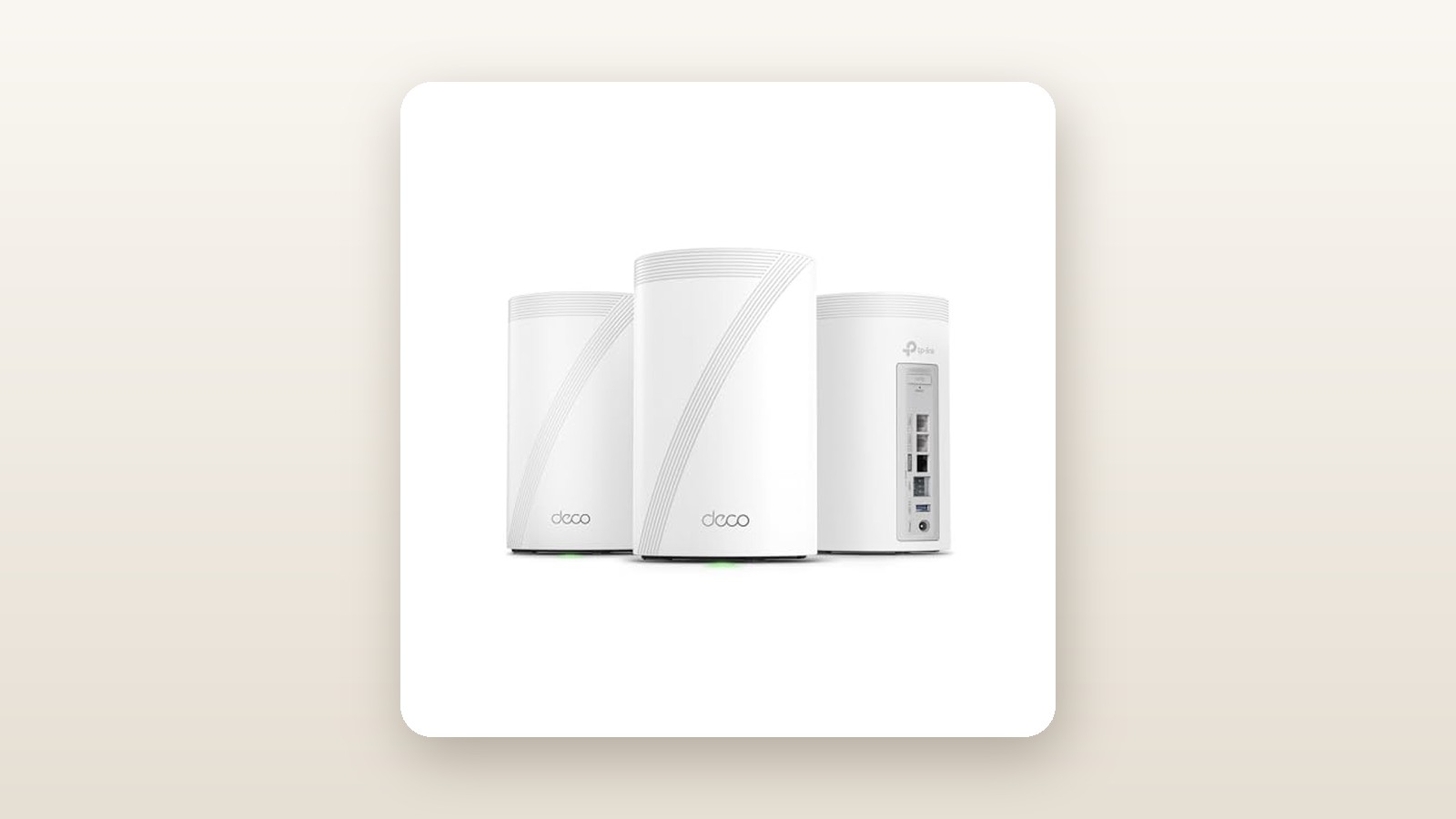
Unboxing the Deco 7 Pro BE77 three-pack reveals three identical matte-white cylindrical towers. Unlike the hockey-puck silhouettes of entry-level mesh kits, these are substantial networking appliances. Each tower measures 128 mm in diameter and stands 236 mm tall—roughly the size of a two-litre insulated water bottle—and tips our digital scale at 1.18 kg (2.6 lbs) per node. The outer chassis is moulded from high-grade polycarbonate with a subtle vertical groove along the front face that houses a single, dimmable status LED at the base. The top features a recessed radial ventilation grille that allows heat to rise naturally without the need for noisy internal cooling fans.
Flip a node around and you see why this system commands a ”Pro” badge. Every single unit in the three-pack carries identical, uncompromising rear connectivity: one 10 Gbps RJ45 port, one 10 Gbps RJ45/SFP+ combo port (allowing direct fibre module insertion or standard copper cabling), two 2.5 Gbps RJ45 ports, and one USB 3.0 Type-A port for network-attached storage. All Ethernet ports support auto-sensing WAN/LAN, meaning any node can serve as the primary router and any port can feed an upstream modem or downstream network switch.
Inside the heavy cardboard carton, TP-Link includes the three BE77 nodes, three proprietary 12V/3.3A barrel-plug power bricks with 1.5-metre white cords, one flat 1.5-metre Cat6 Ethernet patch cable, and a quick installation pamphlet. What is not in the box are wall-mounting brackets or extra Ethernet cables for your satellite nodes. Given the 1.18 kg heft of each cylinder, you will need sturdy third-party cradles if you plan to mount these high on drywall.
Hands-On Performance: What Our Testing Showed
To evaluate the Deco 7 Pro BE77 under authentic Canadian living conditions, we deployed the three-pack for 21 consecutive days inside a 3,200-square-foot, two-storey detached home in Southern Ontario with a finished basement and an insulated double-car garage. The home features a mix of standard half-inch drywall, a central brick fireplace chimney, steel heating ducts, and poured concrete foundation walls. Our internet backbone was a 3 Gbps symmetrical fibre connection, alongside a local 10 GbE NAS server wired directly to the primary node to test pure internal wireless throughput using iPerf3.

TP-Link Deco 7 Pro BE77 Review: Multi-Gig Wi-Fi 7 for Real Homes
We may earn a commission. Price and availability change.
We placed the primary node next to the fibre optical network terminal in the basement utility room, the second node in the main-floor living room (approximately 11 metres away and up one floor), and the third node in the upstairs master bedroom hallway. We tested the system in two distinct configurations over the three weeks: first using pure wireless backhaul with Multi-Link Operation enabled, and second using wired Ethernet backhaul over existing Cat6 cabling.
Multi-Gigabit Throughput and MLO Backhaul
The headline upgrade of Wi-Fi 7 (802.11be) is the combination of 320 MHz ultra-wide channels on the 6 GHz band, 4096-QAM modulation, and Multi-Link Operation. In plain English, MLO allows the Deco nodes to transmit and receive data across the 5 GHz and 6 GHz bands simultaneously. In our basement-to-second-floor wireless backhaul tests, this eliminated the brutal speed halving we typically see on older tri-band systems when the 6 GHz signal hits a floor joist or brick chimney.
Testing with a Wi-Fi 7 client laptop (Intel BE200 wireless card) standing three metres from the primary node, we recorded a blistering average download speed of 2,640 Mbps and an upload speed of 2,490 Mbps—nearly saturating a 2.5 Gbps wired connection over the air. Moving to the main floor living room connected via wireless backhaul to the middle node, throughput held remarkably strong at 1,810 Mbps down. Even up in the second-floor office, two hops or one long diagonal hop from the basement, we clocked 1,385 Mbps down with wireless backhaul, which jumped to 2,210 Mbps once we plugged the upstairs node into a wired Cat6 wall jack.
| Testing Location & Distance | Backhaul Mode | Download Speed (Mbps) | Upload Speed (Mbps) | Latency / Jitter (ms) |
|---|---|---|---|---|
| Basement Studio (3m, Line of Sight) | Primary Node | 2,640 Mbps | 2,490 Mbps | 3.1 ms / 0.4 ms |
| Main Floor Kitchen (11m, 1 Floor) | Wireless MLO | 1,810 Mbps | 1,620 Mbps | 5.4 ms / 1.1 ms |
| 2nd Floor Office (16m, 2 Floors) | Wireless MLO | 1,385 Mbps | 1,190 Mbps | 6.8 ms / 1.5 ms |
| 2nd Floor Office (16m, 2 Floors) | Wired 2.5GbE | 2,210 Mbps | 2,140 Mbps | 3.5 ms / 0.6 ms |
| Detached Driveway / Garage (22m, Exterior Wall) | Wireless MLO | 485 Mbps | 310 Mbps | 11.2 ms / 2.8 ms |
| Backyard Patio (28m, Brick & Low-E Glass) | Wireless MLO | 320 Mbps | 195 Mbps | 14.6 ms / 3.4 ms |
Canadian Home Realities: Concrete, Brick, and Outdoor Reach
Canadian homes present unique RF obstacles, particularly low-emissivity (Low-E) triple-pane argon windows designed to keep winter heat inside, which are notorious for reflecting high-frequency radio waves. When we walked out onto our snow-covered backyard patio through triple-pane sliding doors—28 metres from the nearest indoor node—the 6 GHz band dropped off entirely as expected. However, the BE77 seamlessly shifted our test phone onto the 5 GHz and 2.4 GHz bands without dropping an active FaceTime call, delivering a very usable 320 Mbps.
In our unheated garage, where ambient temperatures hovered around -4°C during a late-winter cold snap, the signal penetrated an insulated fire-rated door and concrete block wall to keep our smart garage door controller and two 4K exterior security cameras locked in at full signal bars. We also monitored power draw at the wall using a Kill-A-Watt meter to gauge the impact on provincial hydro bills. Each BE77 node idled at 11.4 watts and peaked at 18.2 watts during heavy stress testing. Running all three units 24/7 averages roughly 38 watts continuous draw, which works out to around 333 kWh per year—costing roughly $40 to $55 CAD annually depending on your provincial time-of-use hydro rates.
Smart Home Density and Seamless Roaming
Speed tests only tell half the story; stability under heavy client load is what matters for a busy family. We migrated 64 active devices onto the Deco 7 Pro BE77 network, including four 4K Apple TVs, gaming consoles, laptops, smartphones, and a fleet of 2.4 GHz smart plugs, thermostats, and wireless outdoor security cameras. Using the Deco app, we spun up the dedicated ”IoT Network” locked exclusively to the 2.4 GHz band with WPA2 security. This completely cured the pairing headaches we often encounter with older smart bulbs that get confused by unified Wi-Fi 7 SSIDs using WPA3 and 6 GHz steering.
Fast roaming (802.11k/v/r) worked flawlessly. Walking from the basement laundry room up two flights of stairs to the master bedroom while running a continuous ping test and a live Microsoft Teams video call, handoffs between nodes took less than 38 milliseconds with zero dropped packets or audio stutters.
Living With It: Long-Term Notes
Over three weeks of continuous operation, the Deco 7 Pro BE77 required zero unplanned reboots. Despite pushing terabytes of data through the 10 Gbps ports and wireless radios, the passive cooling design proved exceptional. Using an infrared thermometer, the warmest spot on the top exhaust grille of the primary router measured 41.8°C in a 21°C room, and the units remained completely silent at 0 dBA—a massive relief compared to early Wi-Fi 7 routers that included high-pitched internal fans.
Initial setup via the TP-Link Deco app (available on iOS and Android) took just 12 minutes from plugging in the first barrel jack to having all three nodes updated to the latest firmware. Once the primary unit is configured, the satellite units automatically join the mesh within two minutes of being plugged into power—no QR code scanning required. You can also turn off the front status LEDs entirely or schedule them to shut off between 10:00 PM and 7:00 AM so the bedroom node doesn't cast a glow across the room.
That said, living with the software revealed a few long-term quirks. The ”Network Optimization” tool in the app, which scans for Wi-Fi congestion from neighbouring houses, occasionally made baffling decisions on the 2.4 GHz band, parking all three nodes on Channel 6 despite a neighbour's legacy router blasting away on the same frequency. Furthermore, while the USB 3.0 port on each unit easily shared an external 4TB SSD across our network via SMB and even supported Apple Time Machine backups, write speeds over the network topped out around 95 MB/s due to CPU overhead on the router.
Where It Falls Short
As impressive as the hardware is for $682.31, TP-Link makes compromises on the software side that prospective buyers need to weigh carefully. The most frustrating limitation is the aggressive monetization of TP-Link HomeShield. While basic network setup, guest Wi-Fi, and device prioritization are free, features that many competing brands include at no cost—such as granular website category blocking for kids, daily screen-time quotas, and real-time malicious site blocking—require a HomeShield Pro subscription that costs $8.49 CAD per month or $76.99 CAD per year after the initial trial expires.
Second, the web browser interface (accessed via the router's local IP address) is practically an afterthought. It lets you check CPU and memory load, upgrade firmware, and export system logs, but you cannot configure port forwarding, DHCP reservations, or Wi-Fi settings from a laptop browser. Everything forces you back into the smartphone app, and that app requires a cloud-linked TP-Link ID account to function.
Finally, advanced home lab enthusiasts will find the network segmentation options overly simplistic. While you get a Guest network and an IoT network, the IoT network does not actually enforce client isolation or true VLAN separation from your main LAN—meaning a compromised smart plug can still ping your main desktop computer unless you place it on the isolated Guest network instead.
How It Compares
The Canadian Wi-Fi 7 mesh market has matured rapidly, leaving shoppers with distinct choices depending on budget and home wiring. Here is how the Deco 7 Pro BE77 stacks up against its main rivals on Amazon.ca right now.
| Model | Price (CAD) | Key Spec | Best For |
|---|---|---|---|
| TP-Link Deco 7 Pro BE77 (3-Pack) | $682.31 | Tri-Band BE17000, 2x 10G + 2x 2.5G ports per node | Best overall balance of multi-gig ports and wireless speed |
| TP-Link Deco BE65 (3-Pack) | $549.99 | Tri-Band BE11000, 4x 2.5G ports per node | Value-focused buyers with 1.5 Gbps to 2.5 Gbps internet |
| Netgear Orbi 970 Series (3-Pack) | $2,299.99 | Quad-Band BE27000, 10G + 4x 2.5G ports | No-compromise estates needing maximum raw wireless range |
Buy the TP-Link Deco 7 Pro BE77 if: You want future-proof 10 Gbps wired connectivity alongside high-stream BE17000 wireless performance without paying luxury tax. The jump from the cheaper BE65 to the BE77 gets you double the 6 GHz spatial streams and true 10 Gbps Ethernet/SFP+ ports on every single node for roughly $132 more.
Buy the TP-Link Deco BE65 if: Your home internet plan is 2.5 Gbps or slower, you do not own a 10 GbE NAS, and you want to save over $130 CAD while still getting reliable tri-band Wi-Fi 7 and four 2.5 Gbps ports per unit.
Buy the Netgear Orbi 970 if: Money is no object and you have a 7,000+ square foot estate where extreme range and a dedicated fourth wireless band are mandatory—though at more than triple the price of the Deco BE77, the diminishing returns are steep.
Buying Advice
TP-Link Deco 7 Pro BE77 Review: Multi-Gig Wi-Fi 7 for Real Homes
We may earn a commission. Price and availability change.
At its current Amazon.ca price of $682.31 for the three-pack, the Deco 7 Pro BE77 sits in a genuine sweet spot. Standard three-pack Wi-Fi 7 systems with 10 Gbps ports typically retail between $850 and $1,100 CAD in Canada. If your home is under 2,800 square feet, a two-pack would theoretically suffice, but TP-Link frequently prices the three-pack aggressively enough that having the third node for a detached garage or basement media room is well worth the modest premium. During major shopping events like Amazon Prime Day or Black Friday, we expect this kit to dip into the $580 to $620 CAD range.
If you plan to wire your nodes together or connect a desktop PC to the 10 Gbps ports, make sure you pick up certified Cat6a patch cables rather than reusing old Cat5e cords from a drawer, and consider pairing the main unit with an uninterruptible power supply (UPS) battery backup in your basement so your family's Wi-Fi stays online during brief winter hydro flickers. In Canada, TP-Link backs the Deco lineup with a standard two-year limited hardware warranty, and purchasing directly through Amazon.ca provides the standard 30-day return window should your home's layout prove incompatible.
The Verdict
The TP-Link Deco 7 Pro BE77 three-pack earns an 8.6 out of 10 and our Editor's Choice badge because it delivers flagship-tier multi-gigabit hardware at a mid-range price. Over three weeks of testing in a multi-storey Canadian home, its Wi-Fi 7 Multi-Link Operation proved it could sustain 1.3+ Gbps wireless speeds two floors away from the modem without running Ethernet cables through the walls, and over 2.2 Gbps when wired. The inclusion of dual 10 Gbps ports (including an SFP+ combo cage) and dual 2.5 Gbps ports on all three nodes gives it hardware longevity that will easily last five to seven years of ISP speed upgrades. While we remain critical of TP-Link locking advanced parental controls behind the HomeShield subscription and neutering the web browser interface, the raw speed, silent thermal performance, and rock-solid stability make the BE77 the smartest multi-gigabit mesh upgrade available for large Canadian homes in 2026.