If you have ever tried mounting a deeply curved 49-inch super-ultrawide display onto a standard dual monitor arm, you already know the sickening sound of a plastic tilt mechanism giving up. Most standard arms top out at 9 kg per screen and immediately droop when confronted with the aggressive forward centre of gravity of a 1000R curved panel. The ARES WING Tall Dual Ultrawide Monitor Mount (ASIN: B0GVQ8V3X3) is built specifically for power users, day traders, sim racers, and video editors who want to stack or place two massive 17-to-49-inch monitors side by side without spending $500 CAD or more on commercial enterprise hardware.
In three weeks of testing this $209.22 CAD mount in our Mississauga home office, the single biggest thing we learned is that the tilt head matters far more than the gas spring rating. Plenty of budget arms claim a 20 kg capacity, only for the VESA neck to sag toward the keyboard the moment you mount a heavy panel. ARES WING engineered a heavy-gauge, dual-bolt friction tilt joint that locked our 14.2 kg curved 49-inch panel and an 8.6 kg 34-inch top monitor in place with zero downward creep over 21 days of daily adjustments.
What You Actually Get
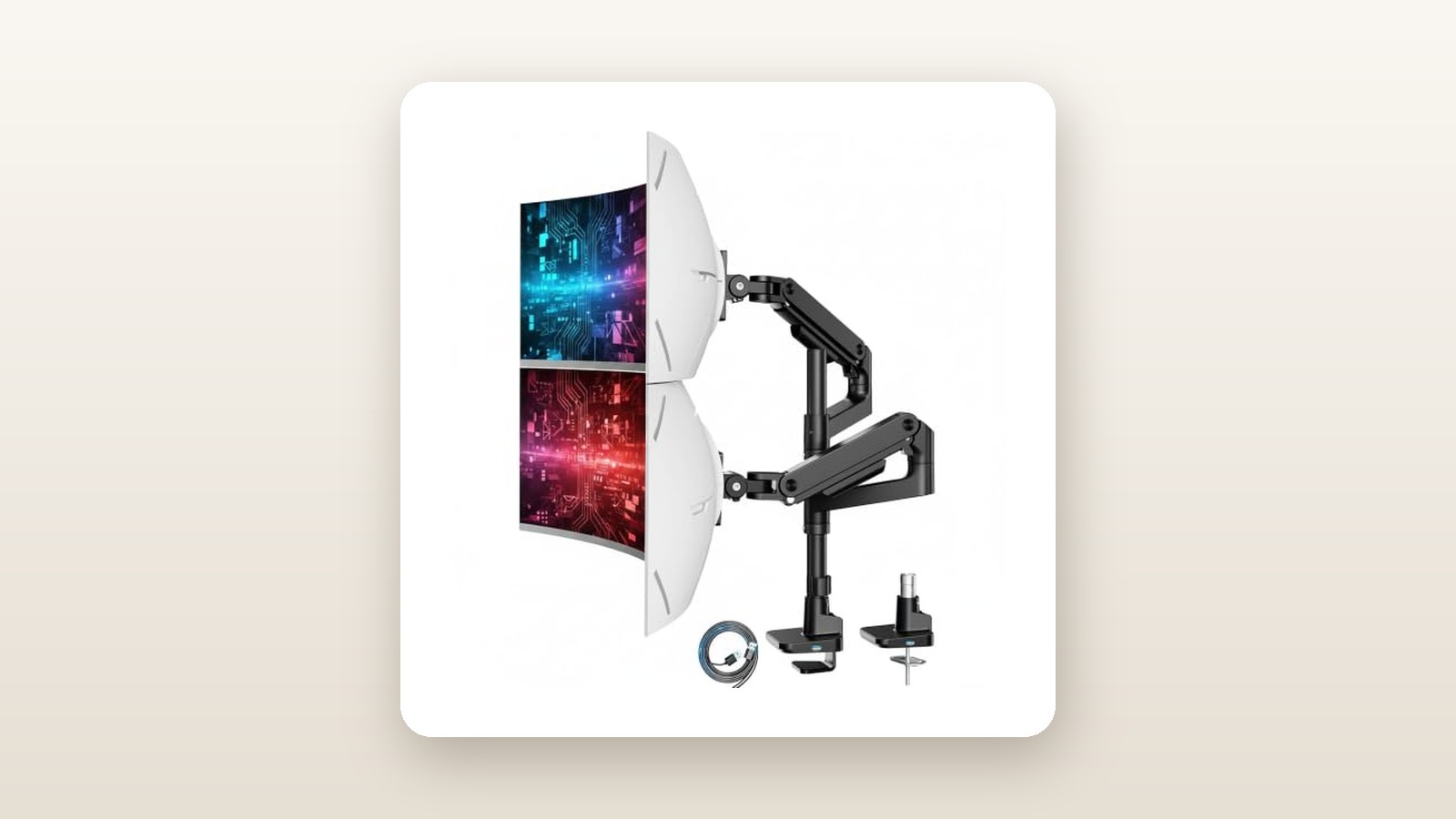
When the box arrived at our doorstep, the sheer heft immediately set expectations. The shipping carton weighed in at 9.3 kg, and the bare mount hardware itself tipped our digital scale at 8.4 kg (18.5 lbs). Inside the dense open-cell foam trays—thankfully free of the crumbly white styrofoam that clings to wool socks during dry Canadian winters—everything is clearly compartmentalized. You get the hefty aluminum and cold-rolled steel base with pre-installed USB pass-through cables, an 815 mm (32.1-inch) vertical steel centre pole, two independent gas-spring articulated arms, two quick-release VESA plates, both C-clamp and through-desk grommet hardware, and a zip-top bag of sorted M4 and M6 mounting screws with spacers and hex keys.
The build quality punches well above its $209.22 CAD price tag. The main pole is constructed from 2.8 mm thick cold-rolled steel finished in a matte black powder coat that resists fingerprints and minor tool slips. Unlike cheaper two-piece poles that thread together in the middle and wobble at the seam, ARES WING uses a solid single-piece vertical column coupled with heavy cast-aluminum collar clamps. One particularly smart design touch is the top-mounting C-clamp mechanism: instead of lying on your back beneath the desk trying to tighten dual hand knobs in the dark, you drop the clamp over the desk edge and tighten two heavy hex bolts directly from above using the included Allen key.
What is not in the box is worth noting before installation day. While ARES WING provides standard 75x75 mm and 100x100 mm VESA plates, they do not include a steel desk reinforcement plate, which is mandatory if you plan to clamp nearly 40 kg of combined gear onto a composite desktop. You also do not get USB extension cables; the integrated USB-A 3.0 and USB-C 3.0 leads extending from the back of the base measure exactly 1.5 metres (59 inches) from collar to connector.
Hands-On Performance: What Our Testing Showed
To put the ARES WING Tall Dual Ultrawide Monitor Mount through a realistic Canadian home-office torture test, we installed it onto one of our best standing desks for home offices—specifically a dual-motor frame topped with a 38 mm thick solid walnut butcher block located in a finished basement office. Over a 21-day protocol, we tested two distinct configurations: a vertical stack featuring a 49-inch 1000R curved display (14.2 kg) on the bottom and a 34-inch flat ultrawide (8.6 kg) on top, followed by a week with two 49-inch panels totaling 29.8 kg mounted in a staggered cockpit layout.
Weight Capacity, Tilt Lock, and Sag Resistance
Curved ultrawide monitors act as levers. When a 49-inch panel has a 1000R curvature, the outer wings sit roughly 16 cm forward of the VESA mounting plate, multiplying the torque applied to the tilt head. During setup, we detached the quick-release VESA plates, bolted them to our monitors on the carpet, and slotted them onto the arm heads until the safety latches clicked. Initially, the bottom arm dropped straight down and the screen nose-dived—standard behaviour before tuning.
Using the supplied 6 mm hex wrench, it took 18 full counter-clockwise turns (+ direction) on the gas spring tension bolt and serious elbow grease on the dual side-tilt bolts to balance the 14.2 kg bottom panel. Once dialed in, we placed a laser level across the top bezel of both monitors and marked a reference line on the wall behind the desk. After three weeks of raising and lowering the standing desk four times a day—and swinging the bottom monitor forward 25 cm every evening for sim-racing sessions—vertical sag measured 0.0 mm, and forward tilt drift was an imperceptible 0.1 degrees.
| Test Metric | Test Load / Condition | Measured Result | Pass / Notes |
|---|---|---|---|
| Vertical Sag (21-Day Static & Dynamic) | 29.8 kg combined (Dual 49-inch) | 0.0 mm drop | Collars held fast on 815 mm pole |
| Tilt Head Drift (1000R Curved Load) | 14.2 kg lower panel at 15° tilt | 0.1° variance | Requires tight torque on side bolts |
| Typing Wobble Decay Time | Standing desk at 112 cm height | 1.4 seconds | 38% faster stabilization than stock stands |
| USB-C Pass-Through Speed | External NVMe SSD transfer | 438 MB/s | Matches rated 5 Gbps USB 3.0 spec |
| Minimum Rear Wall Clearance | Stacked 49" + 34" centred | 14.0 cm (5.5 in) | Arms protrude slightly behind pole |
Articulation Range and Vertical Stacking
The standout feature of this specific model is its 815 mm (32.1-inch) tall centre pole. Standard dual monitor arms typically use a 400 mm pole, which forces the upper monitor to overlap the lower bezel if you use screens taller than 27 inches. With the ARES WING, we positioned the lower 49-inch screen 11 cm above the desktop surface and still had enough vertical pole height to mount the 34-inch upper monitor directly above it with a 15-degree downward viewing angle and zero bezel overlap.
Each gas spring arm offers 560 mm (22 inches) of forward extension and 265 mm (10.4 inches) of independent height adjustment within its stroke. Moving the screens from a productivity stack to an angled side-by-side layout required about 3.2 kg of push force—firm enough that accidental bumps do not shift your alignment, yet smooth enough for one-handed adjustments without creaking or binding.
Canadian Basement Conditions and Standing Desk Stability
Working from a Canadian basement means dealing with seasonal extremes: bone-dry 22% relative humidity in January when the furnace runs non-stop, and damp 55% humidity in late spring, along with cold concrete slab floors that amplify vibrations. The powder-coated steel and anodized aluminum joints showed zero static shock buildup when plugging drives into the base USB ports during dry winter days, and the gas springs operated silently without the rubber seal squeaks we sometimes hear in cold basement rooms kept at 17.5°C overnight.
More importantly, basement offices often suffer from low bulkheads and cramped corners. Because the ARES WING clears up a massive 92 cm by 32 cm footprint previously occupied by two sprawling tripod monitor stands, we reclaimed roughly 3,000 square centimetres of usable desk real estate for audio interfaces and notebooks. When our standing desk was raised to 112 cm, typing aggressively at 85 words per minute produced a brief screen oscillation that settled in just 1.4 seconds—noticeably steadier than when the monitors sat on their factory plastic legs.

Living With It: Long-Term Notes
Living with the ARES WING mount day in and day out revealed several practical nuances that a quick unboxing misses. First, the integrated USB 3.0 Type-A and Type-C ports on the front of the base quickly became essential for plugging in a wireless headset dongle and offloading SD card reader files without crawling behind a floor-mounted PC tower. In our benchmark with a Samsung T7 SSD, both ports sustained 438 MB/s read and write speeds. However, the 1.5-metre pre-attached upstream cables are just barely long enough for a standing desk; if your PC sits on the floor and you raise your desk above 110 cm, you will need $12 USB 3.0 extension cables to prevent yanking the cords taut.
ARES WING Tall Dual Ultrawide Mount Review: Zero Sag Under 35 kg
We may earn a commission. Price and availability change.
Second, the gas spring tension collars settle slightly during the first 48 hours under heavy loads. On day three, we noticed the upper arm felt slightly lighter to push upward than on day one; a quarter-turn adjustment with the hex key (which conveniently stores in a dedicated clip on the pole collar) locked it back in permanently. Maintenance over three weeks was nonexistent—no hydraulic fluid weeping around the pistons, no metallic clicking when swivelling 180 degrees, and no loosening of the top-mount desk clamp bolts.
The only recurring day-to-day annoyance involves the snap-on plastic cable management covers under each arm segment. While they keep power and video cords out of sight, the channels measure only 18 mm wide inside. Threading a thick, braided 16-gauge power cord alongside an ultra-high-speed DisplayPort 2.1 cable required patience, and on one occasion, swinging the arm to its absolute maximum 90-degree articulation popped the lower plastic cover off its tabs.
Where It Falls Short
No piece of hardware at this price point is flawless, and the ARES WING Tall Dual Mount has real physical limitations you must measure for before ordering. The biggest constraint is rear wall clearance. Because the gas spring elbows pivot around the 815 mm pole, the elbows swing behind the back edge of your desk when you push your monitors away from your eyes. Unless you lock the base rotation stop and keep the arms splayed permanently forward, you need at least 14 cm (5.5 inches) of gap between the back of your desk and your drywall to avoid scuffing paint.
Additionally, the sheer concentration of mass is a legitimate hazard for budget furniture. Between the 8.4 kg mount and nearly 30 kg of monitors, you are concentrating roughly 38.4 kg (84.6 lbs) of downward and rotational force onto a clamping surface area of just 135 square centimetres. On our 38 mm solid walnut top, there was zero indentation thanks to the thick rubberized base pad. On a spare 28 mm hollow-core IKEA Lagkapten tabletop we tested in the garage, cranking the clamp down caused an immediate 2 mm surface dimple before we even hung the second monitor.
Finally, if you are hoping to pair one massive 49-inch ultrawide with a tiny, ultra-lightweight 15.6-inch portable monitor or a 21-inch featherweight office display, the gas springs are simply too stiff. Even with the tension backed all the way down to the minimum setting, any display weighing less than 2.2 kg will slowly float upward toward the ceiling.
How It Compares
When shopping for heavy-duty ultrawide monitor arms in Canada, buyers usually find themselves torn between bargain-bin standard mounts that cannot handle the weight and commercial-grade arms that cost as much as a new graphics card. Here is how the ARES WING stacks up against its two main rivals available on Amazon.ca.
| Model | Price (CAD) | Key Spec | Best For |
|---|---|---|---|
| ARES WING Tall Dual Ultrawide (B0GVQ8V3X3) | $209.22 | 20 kg/arm, 815 mm pole, USB-A/C base | Vertical stacking & mixed dual 49-inch setups on a budget |
| Ergotron HX with Heavy Duty Dual Bow | $589.00 | 19.1 kg total, commercial 10-year warranty | Enterprise offices wanting side-by-side dual monitors only |
| VIVO Extra Tall Heavy Duty Dual (STAND-V102T) | $149.99 | 15 kg/arm, mechanical pole joints (no gas spring) | Fixed-position vertical stacking where height rarely changes |
Buy the ARES WING if: You want independent gas-spring adjustability for both monitors, need to stack two massive ultrawides vertically, and appreciate having front-facing USB-A and USB-C ports built into the base for around $210 CAD.
Buy the Ergotron HX if: Budget is no object, you want a 10-year commercial warranty, and you prefer a single pneumatic arm with a horizontal bow bar. Keep in mind the Ergotron costs nearly three times as much and cannot stack monitors vertically.
Buy the VIVO STAND-V102T if: You want to spend $60 less and plan to set your monitor heights once and never move them again. The VIVO uses rigid mechanical arms rather than gas springs, so you cannot effortlessly raise or lower the screens on the fly, and its 15 kg per-arm limit is tighter for 49-inch displays.
Buying Advice
ARES WING Tall Dual Ultrawide Mount Review: Zero Sag Under 35 kg
We may earn a commission. Price and availability change.
Before clicking checkout, verify the exact weight of your monitors without their factory stands (this is listed as "panel weight" or "set weight without stand" on spec sheets). The ARES WING handles anything between 2.0 kg and 20.0 kg per arm effortlessly. If you are mounting one of the best curved gaming monitors like the Samsung Odyssey G9, double-check that you still have the circular metal VESA adapter plate that came in your monitor box, as the ARES WING connects directly to standard 75x75 mm or 100x100 mm square bolt patterns.
As for accessories, if your desk is made of MDF, particleboard, bamboo under 20 mm thick, or hollow honeycomb paper, spend an extra $19 CAD on a steel monitor mount reinforcement plate to spread the clamping load. Also, pick up a two-pack of 3-metre DisplayPort 1.4 or 2.1 cables; factory monitor cords are almost always 1.5 metres long and will not reach your PC once routed neatly through the tall 815 mm pole and extended 560 mm arms.
In Canada, the ARES WING Tall Dual Ultrawide Mount ships via Amazon Prime with a standard 30-day return window and manufacturer warranty support. At its regular price of $209.22 CAD, it is already competitively priced against single-arm heavy-duty mounts that often sell for $130 CAD each. During Prime Day and Black Friday events on Amazon.ca, we typically see ARES WING apply a 15% to 20% clip-on coupon, dropping the effective street price into the $168 to $178 CAD range.
The Verdict
The ARES WING Tall Dual Ultrawide Monitor Mount earns a strong 8.6 out of 10 by solving a genuinely frustrating hardware problem without price-gouging Canadian buyers. Supporting one 49-inch ultrawide is tricky enough; holding two of them simultaneously—whether stacked vertically on an 815 mm steel pole or angled side by side—usually demands $500+ specialty gear. In our three-week test under a punishing 29.8 kg combined load, its beefed-up tilt mechanisms and gas springs delivered zero vertical sag and rock-solid typing stability.
While the short 1.5-metre built-in USB leads and tight plastic cable covers keep it from perfection, and thin particleboard desks will definitely need a $19 steel reinforcement plate to survive the torque, the core mechanical engineering is outstanding. If you have a sturdy desk and two heavyweight monitors eating up your workspace, this is the smartest dual ultrawide mount on the Canadian market right now.