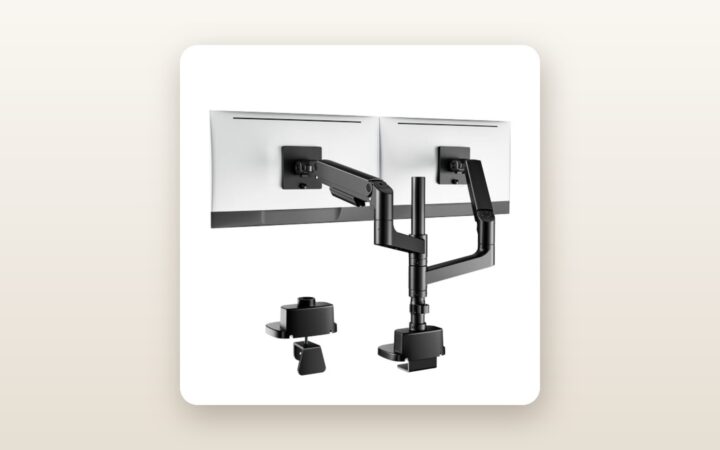
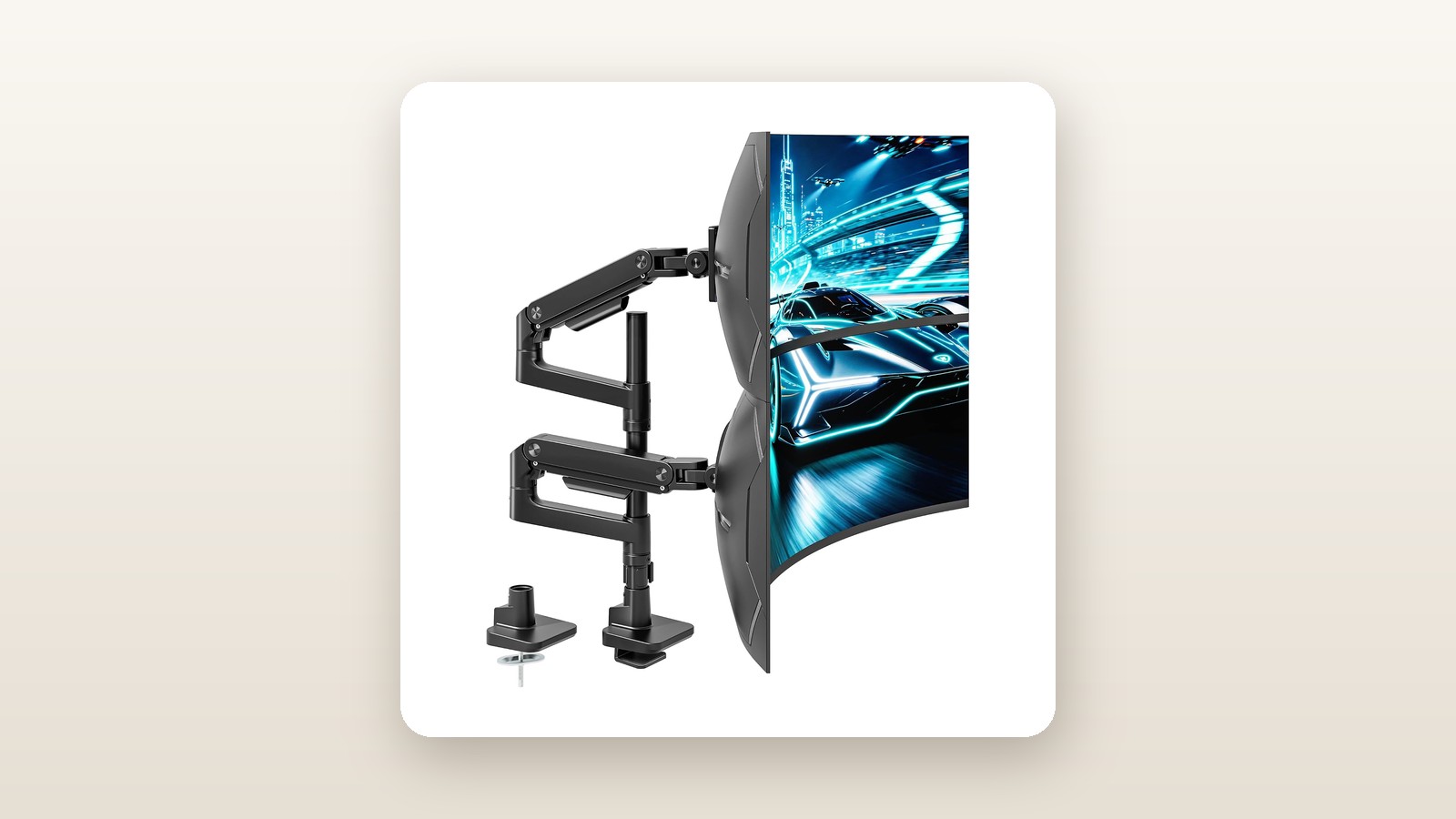
If you have ever tried to mount a 49-inch super-ultrawide display—or stack a pair of 34-inch curved monitors vertically—on a standard desk arm, you already know how the story ends: a slow, agonizing downward droop of the screen's nose until the bezel hits the mousepad. Most consumer monitor mounts top out at 9 to 12 kilograms of capacity, a figure that immediately buckles when confronted with the extreme forward centre of gravity on a 1000R curved panel. The ARESWING Dual Extra Tall Monitor Arm (currently retailing at CAD $187.18) is built specifically for Canadians running heavy-duty multi-screen setups, whether for financial trading, video timelines, sim racing, or sprawling remote-work dashboards.
The single biggest lesson we learned during three weeks of testing this rig in our Mississauga basement office is that vertical pole height dictates horizontal stability far more than marketing materials let on. By pairing an 81.5-centimetre steel central column with two independent, heavy-gauge gas spring arms rated for 20 kilograms apiece, the ARESWING eliminates the precarious over-extension that causes cheaper dual mounts to wobble. It is an unapologetically industrial piece of hardware that trades dainty aesthetics for sheer structural muscle.
What You Actually Get
When the courier dropped the box on our porch, the sheer density was the first giveaway that this was not a typical sheet-metal peripheral. The shipping carton weighs 9.2 kilograms, and the unpacked hardware tips our digital scale at 8.4 kilograms. Inside the dense custom-cut foam trays, the components are neatly segregated: a two-piece 81.5-centimetre vertical pole (40 millimetres in diameter with a 2.8-millimetre steel wall thickness), two cast-aluminium upper and lower arm assemblies, two heavy-duty VESA tilt heads, the C-clamp base, optional grommet-mount hardware, and a compartmented plastic bag of M4 and M6 screws, spacers, and hex keys.
The finish is a matte, lightly textured powder-coated black with subtle dark-grey polymer accents along the cable management channels. Unlike glossy painted arms that pick up oily fingerprints the moment you adjust your screen, this matte skin hides smudges well and resists scuffing when you tighten the collar clamps. The build quality feels reassuringly over-engineered: the primary joints use thick cast-aluminium knuckles with polymer bushings that prevent metal-on-metal grinding during horizontal pans.
One standout feature right out of the box is the top-side mounting C-clamp. On most heavy-duty mounts, installing the base requires lying on your back beneath the desk and awkwardly twisting two long bolts upward while balancing a heavy steel plate above your face. ARESWING routes two long hex bolts down through the top of the base plate. We dropped the base onto the rear edge of our 38-millimetre solid birch butcher-block desk and tightened the entire clamp from above in under 90 seconds using the supplied 6-millimetre T-handle Allen wrench. The clamp accommodates desktops from 12 to 50 millimetres thick via a two-position lower bracket, while the included grommet kit fits through-desk holes between 10 and 60 millimetres wide.
What is not in the box is worth noting if you own a flagship Samsung ultrawide. While the mount includes standard 75x75-millimetre and 100x100-millimetre quick-release VESA plates, screens like the Samsung Odyssey G9 or Neo G9 use a proprietary recessed circular mount. You must supply the factory VESA adapter collar that came in your monitor's original packaging; ARESWING provides the M4x12mm bolts and washers to attach their plate to that adapter, and everything mated flush without play.
Hands-On Performance: What Our Testing Showed
To properly stress-test the ARESWING Dual Extra Tall Monitor Arm, we retired our existing single-arm mounts and installed this unit as our primary daily driver for 21 consecutive days. Our test bench is one of the best standing desks in Canada, topped with a 180-by-76-centimetre solid birch slab situated in a finished Ontario basement where late-winter humidity hovered around 34 percent and ambient room temperatures sat at 19 degrees Celsius. We tested two distinct configurations: first, an asymmetrical vertical stack featuring a 49-inch Samsung Odyssey G9 (14.1 kg, 1000R curve) on the bottom and a 34-inch Dell UltraSharp curved monitor (7.8 kg) on top; second, a side-by-side dual 32-inch 4K monitor setup for standard productivity work.
| Test Metric | Measured Result | Test Condition / Notes |
|---|---|---|
| Max Vertical Reach (Desk to VESA Centre) | 885 mm | Collar at top of 815 mm pole, gas arm angled maximally upward |
| Max Horizontal Arm Extension | 560 mm | Measured from pole centreline to front of VESA quick-release plate |
| 49-Inch 1000R Tilt Head Sag (21 Days) | 0.0 degrees | 14.1 kg curved load; zero downward creep after torque lock |
| Standing Desk Wobble Decay Time | 1.4 seconds | At 112 cm standing height during aggressive 95 WPM typing |
| Minimum Usable Monitor Weight | 4.6 kg | Lighter 24-inch panels failed to stay lowered at minimum tension |
| Full Installation & Balancing Time | 28 minutes | Single tester mounting base, pole, two arms, and routing 4 cables |
Heavy Ultrawide Tilt Stability
The single point of failure on almost every budget monitor arm is the tilt joint right behind the VESA plate. A 49-inch curved monitor acts like a crowbar: because the outer wings curve dramatically forward, the centre of mass sits roughly 14 centimetres ahead of the mounting plate. Standard friction hinges simply slip under that rotational torque. ARESWING uses an enclosed, spring-assisted pivot mechanism inside the VESA head rather than a simple friction bolt. Once we snapped our 14.1-kilogram Odyssey G9 onto the quick-release latch and cranked the side tilt bolt tight with the supplied hex key, the screen stayed locked at a +5-degree upward tilt. Over three weeks—including 42 full up-and-down cycles on our motorized standing desk—our digital angle gauge recorded 0.0 degrees of downward sag.
Vertical Stacking and Pole Clearance
The 81.5-centimetre two-piece centre pole is the real hero for vertical stackers. By threading the upper pole segment into the lower column via a heavy machined steel coupler, you gain enough vertical real estate to position a 49-inch screen comfortably above the desk surface while floating a 34-inch panel directly above it, bezel-to-bezel, with 11 centimetres of pole still to spare. Each arm slides onto the pole via an independent locking collar. Once you set the rough macro-height with the collar, each gas spring arm still delivers 26.5 centimetres of dynamic tool-free vertical travel. That means you can pull the top monitor down and forward when leaning back to watch reference video, then push it back up flush above the lower bezel when coding.
Gas Spring Tension and Range of Motion
Out of the box, the gas springs come dialled near their minimum tension setting for safety. After hanging our 14.1-kilogram and 7.8-kilogram screens, both arms immediately sank to their lowest positions. Using the long Allen key inserted into the adjustment port at the elbow joint, it took 18 full counter-clockwise turns toward the '+' indicator to balance the 49-inch panel, and 11 turns for the 34-inch screen. Once balanced, finger-tip elevation adjustments felt smooth and predictable, requiring roughly 1.5 kilograms of upward or downward hand pressure to reposition the screens.
However, when we swapped out the big ultrawides in week three to test a pair of older, lightweight 24-inch 1080p monitors weighing 3.1 kilograms each, we hit a hard mechanical limit. Even with the gas spring tension backed all the way out to the '-' stop, the internal pneumatic cylinders were simply too strong; the 3.1-kilogram screens slowly floated upward to the top of the stroke like helium balloons. Our testing confirmed that a panel needs to weigh at least 4.6 kilograms to stay planted at any height on these arms.
We also appreciated the selectable 180-degree / 360-degree rotation stop built into the lower arm collar. In most Canadian home offices, desks are pushed close to an exterior insulated wall or basement drywall partition. With the stop pin engaged in the 180-degree mode, the rear elbow knuckles physically cannot swing behind the back edge of the desk, requiring just 9.5 centimetres of wall clearance and completely preventing accidental drywall gouges.
Living With It: Long-Term Notes
Living with the ARESWING Dual Extra Tall mount day in and day out revealed a few nuances that only show up after dozens of hours at the keyboard. The first is how well the mount dampens high-frequency micro-vibrations. When you suspend two massive screens high up on a tall pole, typing hard on a mechanical keyboard—especially with a standing desk elevated to 112 centimetres—often causes the top monitor to shimmer like jelly. Because ARESWING uses a wide 145-by-130-millimetre steel base plate with high-durometer rubber pads, energy transfer is impressively muted. During vigorous typing sessions, the upper 34-inch monitor exhibited a minor oscillation that decayed completely in 1.4 seconds, which is noticeably tighter than single-piece thin-pole mounts we have used in the past.

ARESWING Dual Extra Tall Monitor Arm Review: Heavy-Duty Stacker
We may earn a commission. Price and availability change.
The quick-release VESA mechanism proved to be a genuine back-saver. Trying to hold a 14-kilogram curved monitor in mid-air with one hand while threading tiny M4 screws with the other is a recipe for a cracked LCD panel or a pulled muscle. With this system, you bolt the lightweight steel VESA plates onto the back of your monitors while they lie flat on a bed or carpet, then lift the monitor with both hands and hook the top lip of the plate onto the arm's head until a spring-loaded safety latch clicks into place. A secondary security thumbscrew locks the latch so you cannot accidentally bump the release tab while adjusting screen height.
Maintenance over our three-week test period was practically non-existent, and acoustic noise was zero—no metallic creaks, spring pops, or bushing groans when swinging the monitors out to show a colleague a spreadsheet. The only minor annoyance that surfaced after repeated adjustments was the two-piece pole seam. While the threaded steel coupler joining the lower and upper pole halves is rock-solid structurally, you cannot slide an arm collar directly across the joint line seamlessly; there is a tiny 0.3-millimetre lip where the two tubes meet that requires loosening the collar bolt an extra turn to slip past.
Where It Falls Short
No sub-$200 heavy-duty mount is without compromises, and the ARESWING shows its cost-cutting in a few specific operational areas. First, the cable management channels along the underside of the cast-aluminium arms are frustratingly tight. Each arm features two snap-on plastic covers designed to hide your power and video cords. When we routed a thick braided DisplayPort 1.4 cable, an upstream USB-B cord, and an 18-AWG AC power cord from one monitor through the lower channel, the plastic tabs bowed outward and popped loose the first time we articulated the arm through a full 90-degree bend. We ended up keeping only the DisplayPort and power cords inside the channel and securing the third cable externally with black Velcro ties.
Second, adjusting the tilt angle on the fly is not a tool-free affair. While the heavy-duty spring-assisted tilt head is the exact reason a 49-inch monitor does not droop, locking or unlocking that tilt joint requires substantial manual force on the 6-millimetre hex key. If you like to frequently change your screen's vertical pitch between seated work and reclined gaming, you will have to keep the Allen wrench snapped into the plastic tool holder on the centre pole and loosen the side bolt by half a turn every single time.
Finally, you must respect the physics of what this mount does to your desk surface. When you load this 8.4-kilogram mount with two large monitors totalling 25 to 35 kilograms and extend the arms forward, you are placing an immense cantilevered bending moment onto a concentrated footprint along the back edge of your desk. On our 38-millimetre solid birch top, there was zero deflection. However, we briefly clamped it to a budget 18-millimetre particleboard worktable in our garage workshop; under a 22-kilogram combined load, the particleboard visibly flexed by 2.5 millimetres, pitching both monitors slightly forward. If your desk is thin or hollow, this arm requires a steel reinforcement plate.
How It Compares
To put the ARESWING Dual Extra Tall Monitor Arm in context for Canadian shoppers, we compared it directly against two popular heavy-duty alternatives available on Amazon.ca and through specialty ergonomic retailers: the budget-friendly Putorsen Heavy Duty Dual Monitor Arm and the ultra-premium Ergotron HX with Heavy Duty Tilt Pivot.
| Model | Price (CAD) | Key Spec | Best For |
|---|---|---|---|
| ARESWING Dual Extra Tall (B0GTYNNNXD) | $187.18 | 20 kg per arm (x2), 815 mm pole | Stacking two ultrawides (up to 49 in) on a budget |
| Putorsen Heavy Duty Dual Ultrawide Arm | $159.99 | 15 kg per arm (x2), 450 mm pole | Side-by-side 34-inch setups with lower height needs |
| Ergotron HX Single (with HD Pivot) | $529.00 | 19.1 kg (single screen), 10-year warranty | Enterprise offices wanting effortless single-screen tilt |
Buy the ARESWING Dual Extra Tall if: You want to vertically stack two massive screens (like a 49-inch and a 34-inch, or twin 45-inch panels) without spending over $1,000 on two separate commercial mounts. Its 81.5-centimetre pole and 20-kilogram-per-arm rating give it a distinct capacity and height advantage over cheaper dual mounts.
Buy the Putorsen Heavy Duty Dual Arm if: You are running two moderate-weight 27- to 34-inch monitors side by side, or stacking smaller 27-inch panels, and want to save roughly $28. Its shorter pole cannot comfortably stack two tall curved monitors without the top screen overlapping the bottom bezel, and its 15-kilogram limit struggles with aggressive 1000R 49-inch panels.
Buy the Ergotron HX if: Budget is no object and you want buttery-smooth, tool-free fingertip tilt adjustments on a single flagship monitor. The Ergotron's build precision and cable routing are superior, and it carries a decade-long commercial warranty, though mounting two monitors requires buying two separate units for over $1,050 CAD before tax—more than five times the price of the ARESWING.
If you are still deciding which screen layout makes the most sense for your workflow, take a look at our guide to the best ultrawide monitors for productivity, or check out our roundup of ergonomic office chairs for long hours to ensure your seating posture matches your new vertical screen stack.
Buying Advice
ARESWING Dual Extra Tall Monitor Arm Review: Heavy-Duty Stacker
We may earn a commission. Price and availability change.
The ARESWING Extra Tall line comes in a few finishes on Amazon.ca, typically matte black, white, and a silver/grey space-grade look. Stick with the Black variant (B0GTYNNNXD) if you want the lowest price and cleanest visual blend behind dark monitor bezels; the white variant occasionally carries a $10 to $15 price premium. Before ordering, measure the vertical height of your bottom monitor and double-check that your ceiling or overhead hutch shelves have at least 95 centimetres of clearance above the desk surface if you plan to stack two screens.
As for accessories, the single best $22 investment you can make alongside this mount is a heavy-duty steel monitor mount reinforcement plate if your desktop is anything less than 25-millimetre solid wood or bamboo. In addition, because the 81.5-centimetre pole pushes the upper monitor quite high, factory 1.5-metre DisplayPort and HDMI cables included with most monitors will pull taut when you raise a standing desk; pick up a pair of VESA-certified 3-metre (10-foot) DisplayPort 1.4 or HDMI 2.1 cables so your cords have plenty of slack to follow the arm joints.
In Canada, purchasing through Amazon.ca gets you the standard 30-day return window—keep the custom foam inserts for at least two weeks in case your desk cannot handle the concentrated weight. Pricing on the ARESWING Dual Extra Tall hovers reliably around CAD $187 to $199 throughout the year, though we frequently see $20 to $30 clip-on coupons appear on the listing page, and prices typically dip toward the $149 to $159 mark during July Prime Day and late-November Black Friday promotions.
The Verdict
The ARESWING Dual Extra Tall Monitor Arm solves a notoriously expensive ergonomic problem for Canadian power users. Until recently, safely suspending two massive ultrawide monitors required either clamping two separate heavy-duty single arms to your desk—eating up footprint and costing upwards of $400 to $1,000—or settling for a standard dual pole mount whose tilt joints inevitably surrendered to gravity. At CAD $187.18, ARESWING delivers legitimate 20-kilogram-per-arm lifting power, a zero-sag spring-assisted VESA head that tames 49-inch 1000R curved panels, and an 81.5-centimetre pole tall enough for true vertical stacking.
It loses a few points for its cramped plastic cable trays, stiff minimum gas-spring tension that rejects lightweight 24-inch screens, and the sheer wrench torque required to adjust the tilt angle. Yet those are minor trade-offs for a mount that holds nearly 40 kilograms of combined display hardware with rock-steady composure. For multi-monitor enthusiasts with a sturdy desk, it earns a strong 8.6 out of 10 and our Best Value badge.