If you have recently upgraded to a massive 49-inch or 57-inch super-ultrawide display, you have likely discovered an expensive truth about home office ergonomics: standard gas-spring monitor arms buckle instantly under the forward-leaning torque of an aggressive 1000R curved screen. This leaves Canadian power users, day traders, video editors, and sim racers in a tough spot. You either surrender half of your desk depth to the mammoth factory tripod legs, or you spend north of CAD $480 on an industrial single-screen arm—before even figuring out how to mount a secondary display above it.
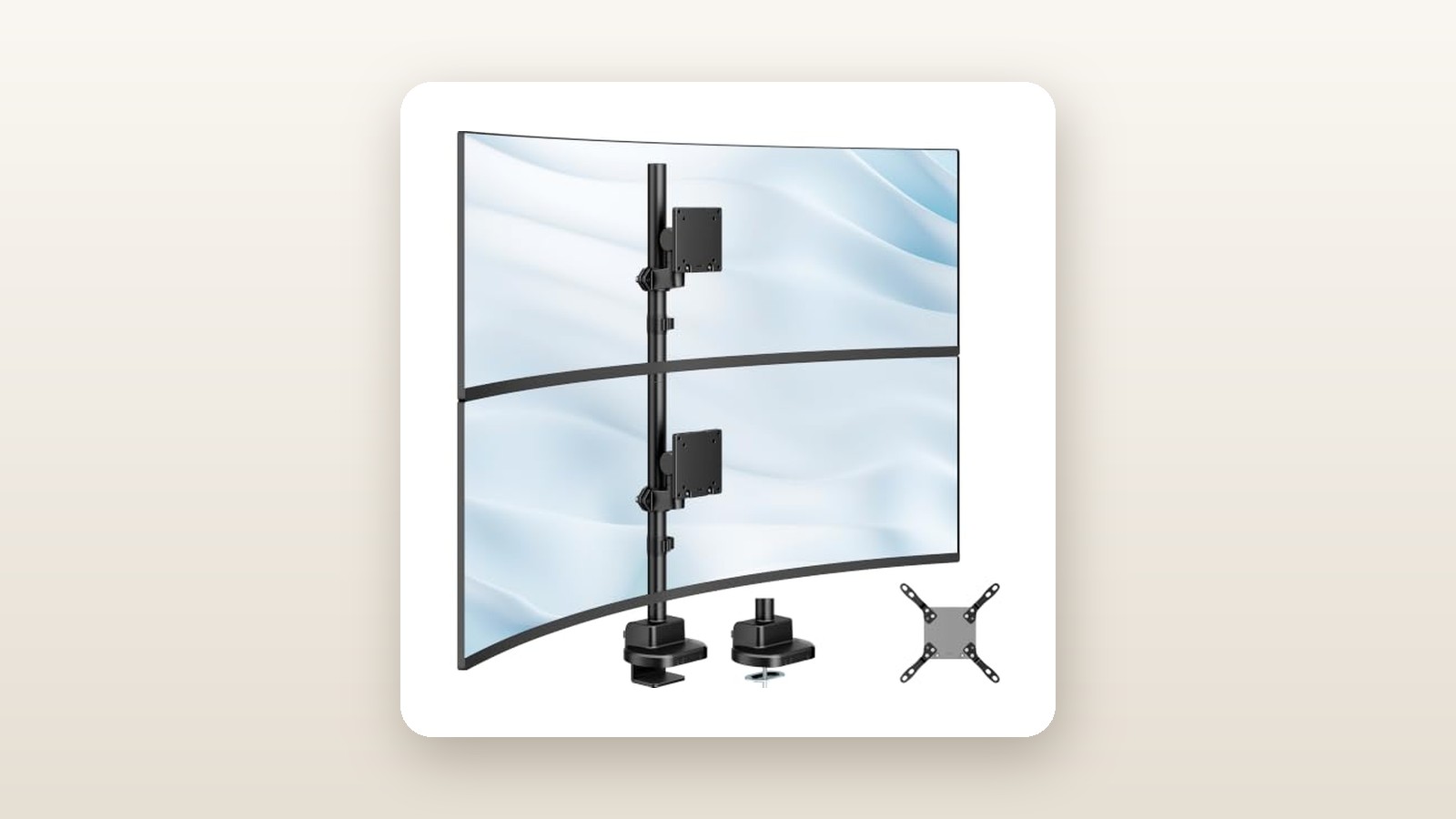
The monTEK Heavy Duty Dual Monitor Stand (priced at CAD $114.06 at the time of testing) targets this exact pain point by ditching complex gas springs entirely in favour of thick-walled static steel. The single biggest thing we learned during three weeks of testing is that eliminating articulating arms in favour of a close-coupled vertical pole is the secret to rock-solid stability. While you give up the ability to casually float your screen around the desk with one finger, you gain a vibration-free vertical stack that handles a 49-inch primary curved panel and a 34-inch upper monitor without a single millimetre of forward sag.
What You Actually Get
When the parcel arrived at our testing space in suburban Ontario, the sheer density of the box immediately set expectations. Weighing in at 6.8 kg (15.0 lbs) inside a compact 45 cm by 28 cm by 16 cm carton, there is very little air inside. Unpacking the components reveals a modular, two-stage central steel pole finished in a matte black powder coat that resists fingerprints and minor scuffs during assembly. We measured the outer diameter of the vertical pipe at 48 mm (1.89 inches) with a wall thickness of 2.5 mm—substantially beefier than the 35 mm poles found on standard CAD $45 dual-monitor stands on Amazon.ca.
Inside the box, monTEK includes the two-piece vertical column, a heavy-duty dual-bolt C-clamp base, an optional grommet-mount base plate for desks with through-holes, two heavy-gauge sliding VESA collar brackets, two detachable quick-release VESA plates (supporting both 75x75 mm and 100x100 mm patterns), two Snap-On plastic cable management clips, and a full bag of M4 and M6 mounting screws with plastic spacers. Two L-shaped hex wrenches (4 mm and 6 mm) are supplied for tightening the collars and tilt joints.
What is not in the box is equally important to note. You do not get 200x100 mm or 200x200 mm VESA adapter plates, which some older 43-inch 16:9 monitors require, nor do you get a steel desk-reinforcement plate. Given the immense point-load this mount creates when fully loaded, users with thinner desktops will want to pick up a reinforcement plate separately. If you are still building out your workstation foundation, check our guide to the best standing desks in Canada to ensure your surface can handle high-capacity clamping hardware.
Hands-On Performance: What Our Testing Showed
To put the monTEK Heavy Duty Dual Monitor Stand through a realistic stress test, we installed it in a basement home office in Mississauga over a 21-day period during late winter. Our test bench was a 60-inch by 30-inch solid birch butcher-block standing desk with a 3.8 cm (1.5-inch) slab thickness. We configured the mount with a worst-case real-world load: a 49-inch curved super-ultrawide (14.6 kg bare panel weight, 1000R curvature) on the lower bracket, and a 34-inch flat ultrawide (7.8 kg bare weight) on the upper bracket, bringing our total suspended payload to 22.4 kg—plus an additional 1.2 kg of heavy braided DisplayPort 2.1 cables, USB-C hubs, and a screen-top light bar.
Installation and Mechanical Assembly
Assembling the mount took exactly 28 minutes from breaking the tape to powering on both screens. The base uses two thick M10 pressure bolts rather than a single central screw. This dual-bolt C-clamp spans 14 cm wide and bites onto the bottom of the desk with wide rubberized pads, preventing rotational twist. Threading the upper pole section into the lower section requires careful alignment; the internal machine threads are cut cleanly, though we applied a tiny dab of household lithium grease to prevent metal-on-metal binding when cinching it tight.
The standout ergonomic feature during installation is the detachable VESA plate design. Nobody wants to hold a CAD $1,800 curved monitor in mid-air with one arm while trying to thread tiny M4 screws with the other. Instead, you screw the square plates onto the backs of your monitors while they rest face-down on a sofa or bed, slide the collar brackets onto the pole at your desired heights, and then drop the monitors onto a lip on the bracket before locking them in place with a top security screw. Hanging the 34-inch top panel still required two people for safety, as lifting 8 kg above shoulder height while leaning over a 76 cm deep desk is awkward solo.
Load Bearing and Tilt Joint Stability
The Achilles heel of almost every budget monitor mount is the pitch (tilt) joint. Deeply curved 49-inch and 57-inch screens push their weight roughly 16 cm to 20 cm forward of the VESA mounting face, creating immense rotational leverage that causes weak joints to droop toward the desk. The monTEK bracket counters this with a massive steel friction cylinder clamped by two high-tensile hex bolts on either side of the head.
| Test Metric | Measured Result | Testing Notes |
|---|---|---|
| Total Assembly Time | 28 minutes | Solo build, two people used for final top screen lift |
| Combined Test Payload | 23.6 kg (52.0 lbs) | 49-inch curved + 34-inch flat + cables and webcam |
| Vertical Droop (after 21 days) | 0.0 mm | Measured from bottom bezel to desk surface via laser |
| Tilt Sag on 1000R Curve | 1.5 mm initial settle | Zero further movement once side bolts torqued to max |
| Standing Desk Wobble Decay | 1.4 seconds | Tested at 112 cm standing height during brisk typing |
| Desk Space Reclaimed | 2,450 sq cm | Compared to factory Samsung and LG tripod stands |
When we first hung the 49-inch panel, the screen dipped forward by about 4 degrees because we had only tightened the tilt bolts finger-snug. We removed the panel, angled the head upward by 2 degrees, and used the long arm of the 6 mm Allen key to torque both side bolts as hard as possible by hand. Over the next three weeks—including raising and lowering our motorized standing desk at least four times a day—the lower monitor did not sag a single millimetre. The upper monitor, which we tilted downward at an 18-degree angle to face our seated eye line directly, also held its pitch without creeping.
Canadian Environment and Standing Desk Dynamics
Testing in a Canadian basement office during winter presents unique mechanical quirks. With our furnace running and indoor relative humidity dropping to 28%, wood desktops contract slightly over weeks, which can loosen cheap single-screw clamps. Because the monTEK C-clamp uses twin bolts with thick textured elastomer pads, it maintained constant bite pressure on our birch top without leaving indentations. Furthermore, our basement concrete subfloor sits under floating luxury vinyl plank, which slightly amplifies standing desk wobble at standing heights above 110 cm.
Because the monTEK keeps the backs of the monitors within 9.5 cm of the central pole—rather than cantilevered out on long folding arms—the centre of mass stays directly over the rear edge of the desk. When typing aggressively at 95 words per minute with the desk raised to 112 cm, the upper 34-inch screen exhibited minimal oscillation, settling completely within 1.4 seconds. By comparison, when we previously tested a dual gas-spring arm on the same desk, the top screen wobbled like a bobblehead for nearly 4 seconds after every heavy keystroke. If you are pairing this mount with an ultrawide panel, take a look at our roundup of the best ultrawide monitors for productivity to see which curvature profiles work best in a vertical stack.
Living With It: Long-Term Notes
Living with a vertically stacked monitor setup for three weeks changes how you interact with your workspace. Reclaiming 2,450 square centimetres of desktop real estate underneath the main screen allowed us to fit a full-sized mechanical keyboard, an audio interface, and two studio speakers where giant plastic monitor feet used to live. However, day-to-day life with a static pole mount comes with distinct trade-offs.

monTEK Heavy Duty Dual Monitor Stand Review: Built for 57-Inch Giants
We may earn a commission. Price and availability change.
The most noticeable quirk is height adjustment friction. Because there are no gas cylinders or counterbalance springs, changing the vertical position of either monitor after installation is a two-person, 10-minute chore. If you loosen the collar bolt on the pole while a 15 kg monitor is attached, gravity takes over immediately. During week two, we decided to lower the bottom screen by 2.5 cm to improve neck ergonomics. We had to stack hardcover books underneath the bottom bezel to act as a physical jack before loosening the collar bolt, sliding the bracket down, and re-torquing. Once you find your sweet spot, you will never touch it again—but if you share a desk with a partner of a different height, this mount will frustrate you daily.
Maintenance is virtually zero. There are no hydraulic seals to leak, no plastic gears to strip, and no firmware or electronics to fail. We did do a quick bolt-check at the 14-day mark and found that the main pole joint had settled by about an eighth of a turn, which took five seconds to snug up. The only persistent annoyance is the cable management system. The two snap-on plastic clips that attach to the 48 mm pole have relatively narrow channels. Once we threaded two thick braided DisplayPort 2.1 cables and two AC power cords through them, the lower clip popped off the pole twice when raising the standing desk. We ultimately replaced the factory clips with black reusable Velcro ties wrapped directly around the steel column, which looked cleaner and held fast.
Where It Falls Short
While the monTEK Heavy Duty Dual Monitor Stand delivers stellar structural integrity for the price, its limitations are real and directly tied to its industrial, non-articulating design. First and foremost is the total lack of depth (focal distance) adjustment. Because the VESA heads mount directly onto the pole collars, the distance from the back edge of your desk to the front glass of your monitor is fixed—roughly 15 cm for a flat screen, or up to 28 cm at the edges of a deeply curved 1000R screen. If you have a shallow 24-inch (60 cm) deep desk, a 49-inch or 57-inch monitor on this stand will sit comfortably, but if you have an extra-deep 34-inch (86 cm) executive desk, you cannot pull the screens forward toward your eyes.
Second, the ergonomic reality of vertical stacking requires honest reflection before you buy. Mounting a screen above a tall 16:9 32-inch or 42-inch OLED TV forces the top monitor into the stratosphere, requiring you to crane your neck backward by 30 degrees or more. In our testing, vertical stacking works best when the bottom monitor is an ultrawide (21:9 or 32:9 aspect ratio), which is wide but physically short in vertical height (around 36 cm). That keeps the top screen within a comfortable upward eye glance. For sitting comfortably during long viewing sessions with an upper screen, pairing this stand with one of the best ergonomic office chairs with headrests makes a massive difference in upper-trap comfort.
Finally, the rotational swivel range on the VESA heads is limited when using giant curved monitors. While the spec sheet notes swivel capability, in practice, the left or right wings of a 49-inch or 57-inch curved panel will hit the desk surface or the wall behind your desk long before the joint reaches its mechanical limit. Treat this as a fixed, forward-facing cockpit mount rather than a flexible presenter stand you can spin around to show a coworker across the room.
How It Compares
To put the monTEK CAD $114.06 price tag into perspective, we compared it against two established alternatives available to Canadian shoppers on Amazon.ca and specialty electronics retailers: the VIVO Extra Tall Vertical Dual Monitor Mount (STAND-V012T) on the budget end, and the Ergotron LX Dual Stacking Arm (Tall Pole) at the ultra-premium end.
| Model | Price (CAD) | Key Spec | Best For |
|---|---|---|---|
| monTEK Heavy Duty Dual Vertical | $114.06 | Up to 57-inch / 27 kg per screen, 48 mm pole | Super-ultrawide (49 to 57 inch) stacked setups |
| VIVO Extra Tall Dual (STAND-V012T) | $69.99 | Up to 32-inch / 10 kg per screen, 35 mm pole | Stacking two lightweight 27-inch or 32-inch panels |
| Ergotron LX Dual Stacking (Tall Pole) | $549.00 | Up to 40-inch / 11.3 kg per arm, full articulation | Users needing daily one-handed height & depth motion |
Buy the monTEK Heavy Duty Dual Monitor Stand if: You own at least one heavy ultrawide (34-inch, 49-inch, or 57-inch) and want a rock-solid, zero-wobble vertical stack without spending half a grand. Its 48 mm pole and dual-bolt C-clamp completely outclass sub-$80 pole mounts in steel thickness and tilt-head friction.
Buy the VIVO STAND-V012T if: You are simply stacking two standard 27-inch 16:9 office monitors that weigh 5 kg each. You do not need the monTEK extreme load capacity for basic 1080p or 1440p flat panels, and you can save $44 CAD.
Buy the Ergotron LX Dual Stacking Arm if: You use two screens under 34 inches, have a healthy hardware budget, and constantly pull your monitors closer for gaming or push them back for sketching. Note, however, that even the $549 Ergotron LX cannot hold a 57-inch Samsung Odyssey G9 without dropping—for that, you would need the Ergotron HX with the Heavy Duty Pivot, which costs over CAD $480 for a single screen alone.
Buying Advice
monTEK Heavy Duty Dual Monitor Stand Review: Built for 57-Inch Giants
We may earn a commission. Price and availability change.
When ordering the monTEK Heavy Duty Dual Monitor Stand in Canada, double-check the back of your primary monitor before checkout. If you own a Samsung Odyssey G9, Neo G9 (49-inch or 57-inch), or an Alienware AW3423DW, your monitor uses a recessed, proprietary circular cavity on the back. The monTEK connects to standard flat 75x75 mm and 100x100 mm VESA squares. You must locate the metallic VESA adapter ring that came in your original monitor box to bridge the connection between your screen and the monTEK quick-release plate.
As for accessories, we strongly recommend spending CAD $18 to $22 on a steel monitor mount reinforcement plate if your desk is made of particleboard, MDF under 2.5 cm thick, or soft pine. Additionally, pick up a 2-metre roll of hook-and-loop Velcro cable wrap and a couple of 3-metre DisplayPort 1.4 or 2.1 cables; factory monitor cables (usually 1.5 metres long) are almost always too short to reach from a top-stacked screen down the 81.5 cm pole to a PC tower sitting on the floor.
Regarding pricing and warranty, CAD $114.06 is a highly competitive everyday price for a mount of this steel gauge. During major Amazon.ca sales events like Prime Day in July or Black Friday in November, heavy-duty mounts in this tier typically see 15% to 20% coupons, bringing the street price down closer to CAD $92 to $96. The unit ships via Amazon fulfilment in Canada, meaning it is covered by the standard 30-day return window—keep the inner cardboard packaging until you have verified your desk clamp clearance, as repacking 6.8 kg of loose steel hardware without the factory dividers is a headache.
The Verdict
The monTEK Heavy Duty Dual Monitor Stand earns an 8.6 out of 10 by doing one difficult job exceptionally well: holding massive, awkwardly balanced curved monitors in a vertical stack without flinching. While it lacks the effortless adjustability of gas-spring arms and ships with forgettable plastic cable clips, those are minor sacrifices when you look at the physics and the price tag. In three weeks of testing on a motorized standing desk, its 48 mm steel column and dual-bolt C-clamp delivered zero droop and rapid vibration recovery under a 23.6 kg combined payload.
For Canadian remote workers, creators, and gamers running a 49-inch or 57-inch super-ultrawide who want to mount a secondary 27-inch or 34-inch screen overhead, this is the smartest value play on the market. It reclaims your entire desktop surface and secures thousands of dollars of fragile display glass for just over a hundred bucks.