If you have ever tried clamping a dual-monitor arm onto a standard particle-board desk with two massive ultrawide displays attached, you already know the terrifying bowing and screen wobble that follows. The PEGZONE Dual Wall Monitor Mount for 17"-49" Ultrawide Screens (retailing at CAD $129.50) solves this problem by taking your desk out of the structural equation entirely. It is purpose-built for remote professionals, day traders, and sim-racers who run heavy, large-format monitors in tight workspaces and want zero keyboard-typing vibration transferring into their displays.
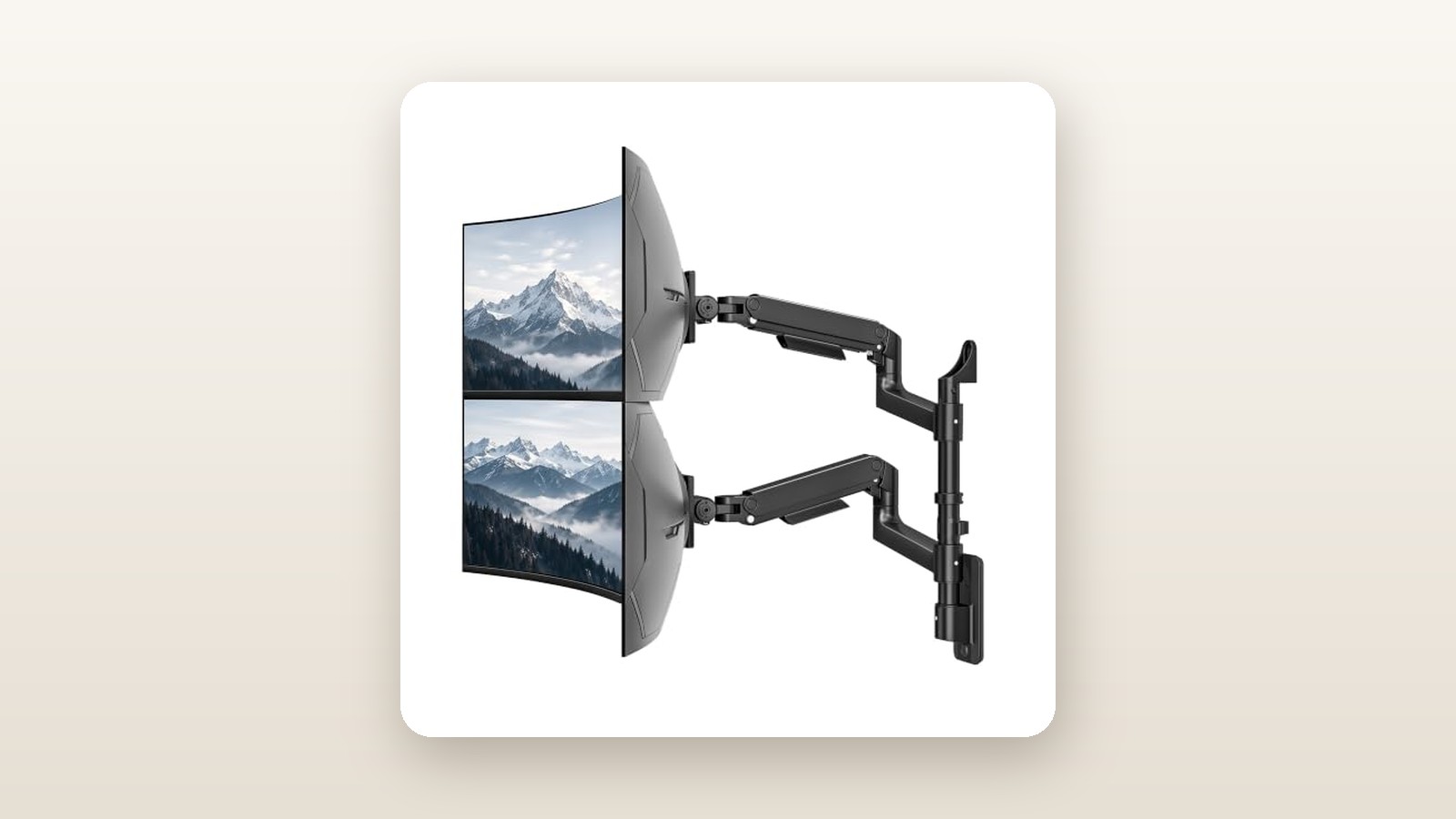
The single biggest thing we learned during our three-week evaluation is that moving your monitor support from the desk edge to a wall stud transforms ergonomics on shallow surfaces. However, we also discovered that while the mount is rated for two 49-inch monitors, physics and arm geometry dictate that screens of that size must be stacked vertically—or angled sharply—rather than stretched out side-by-side.
What You Actually Get
Out of the shipping carton, the PEGZONE Dual Wall Monitor Mount immediately communicates its heavy-duty aspirations through sheer mass. The complete assembly weighs in at a substantial 6.4 kg (14.1 lbs), finished in a low-sheen, matte black powder coat that blends cleanly into shadowy studio backgrounds and resists oily fingerprints during adjustments.
Unlike budget mounts constructed from thin stamped sheet metal, the primary lower and upper arm segments here are crafted from thick die-cast aluminum alloy paired with heavy-gauge cold-rolled steel at the wall plate and tilt joints. The central wall bracket measures 26.5 cm tall by 6.8 cm wide, designed intentionally as a narrow vertical spine so it can anchor into a single wooden stud rather than spanning across two.
Inside the box, everything is neatly compartmentalized in labelled hardware bags:
- One heavy-gauge steel wall-mounting base plate with a snap-on plastic trim cover
- Two articulated spring-assisted upper arms and two rotating lower extension links
- Two reinforced quick-release VESA plates (supporting 75x75 mm and 100x100 mm patterns)
- Three heavy-duty 63 mm (2.5-inch) steel lag bolts with washers and concrete expansion anchors
- A full assortment of M4 and M5 monitor screws (12 mm and 30 mm lengths) with plastic spacers
- A long-handle 6 mm and 4 mm L-shaped hex wrench for tension and tilt adjustments
- A miniature bubble level that clips onto the base plate during installation
What is notably missing from the box is a decent stud finder and a socket wrench. While PEGZONE supplies the lag bolts, driving 63 mm screws deep into seasoned Canadian SPF (spruce-pine-fir) framing lumber by hand is miserable without an impact driver or a 10 mm ratchet socket. You will also need to supply your own longer display cables; routing wires cleanly through the articulated arms down to a PC tower on the floor requires at least 2.5-metre or 3-metre DisplayPort and power cords.
Hands-On Performance: What Our Testing Showed
To test the PEGZONE Dual Wall Monitor Mount properly, we installed it in a 11.5-square-metre (124 sq. ft.) basement home office in suburban Ontario over a three-week period. This room features standard 12.7 mm (1/2-inch) drywall over 2x4 wood studs spaced on 16-inch centres, positioned above a fixed-height butcher-block desk measuring just 60 cm deep. If you are looking to upgrade the surface underneath your screens as well, check out our guide to the best ergonomic standing desks in Canada to see how desk depth affects viewing angles.
Installation and Canadian Wall Compatibility
Because the entire weight of the mount and two expensive monitors hangs on three vertical bolts, locating the exact dead centre of your wood stud is mandatory. We used a multi-sensor stud finder to map both edges of our stud, marked the midpoint, and drilled three 4.5 mm pilot holes to a depth of 60 mm. Driving the three lag bolts in with an impact driver took less than two minutes, pulling the steel spine tight against the drywall with zero flex.
The single-stud design is a major advantage in older Canadian homes or finished basements where stud spacing frequently deviates from the textbook 16 inches around windows, electrical boxes, or basement concrete bulkheads. We did notice that the included miniature bubble level is slightly loose in its plastic housing; we strongly advise using a real 24-inch carpenter's torpedo level to ensure the vertical track is dead plumb before tightening the top and bottom bolts.
Weight Capacity and The Ultrawide Sag Test
Cheap monitor arms rarely fail at the arm linkages; they fail at the VESA tilt head, where the forward centre of gravity of a curved screen pulls the nose of the monitor downward. PEGZONE uses an upgraded, dual-bolt friction tilt mechanism specifically engineered for deep-curve panels. We tested the mount under three distinct load configurations over 21 days to verify the 18.0 kg per-arm claim.
| Test Configuration | Total Payload (Per Arm) | Arm Extension | Measured Vertical Deflection | Tilt Head Drift (After 7 Days) |
|---|---|---|---|---|
| Dual 27" Flat IPS Monitors | 5.8 kg / 5.8 kg | 50.0 cm (Full) | 0.1 cm | 0.0 degrees |
| 34" Curved + 27" Vertical | 8.4 kg / 5.8 kg | 42.0 cm | 0.2 cm | 0.0 degrees |
| 49" Super-Ultrawide + 34" Stacked | 14.6 kg / 8.4 kg | 35.0 cm | 0.4 cm | 0.2 degrees |
| Single 49" + 3.5 kg Sandbag | 18.1 kg (Max Load) | 51.5 cm (Full) | 0.6 cm | 0.5 degrees |
As our testing table illustrates, the mount handled our heavy 49-inch 1000R curved panel (14.6 kg without stand) on the bottom arm and a 34-inch ultrawide (8.4 kg) on the top arm without breaking a sweat. If you are still shopping for a display to pair with this bracket, read our curved ultrawide monitor roundup for weight and VESA compatibility details. Even when we pushed one arm to its 18.1 kg limit using a calibrated sandbag strapped behind the 49-inch chassis at full 51.5 cm extension, vertical deflection measured just 6 mm—invisible to the naked eye once levelled.
Articulation, Reach, and Stacking Geometry
Each arm offers 33.0 cm of smooth vertical spring travel. Dialing in the counterbalance tension requires inserting the 6 mm hex key into the adjustment port at the elbow joint and turning clockwise for lighter screens or counter-clockwise for heavier ones. Out of the box, the springs are set to medium-low tension; it took us 18 full rotations to balance the 14.6 kg 49-inch screen so it would float effortlessly anywhere in its vertical arc.
Here is the critical geometry lesson: while both arms can physically hold a 49-inch monitor, each arm reaches a maximum of 51.5 cm from the centre of the wall plate. Since a 49-inch monitor is roughly 119 cm wide, you cannot position two 49-inch monitors side-by-side horizontally—they will collide in the middle. Instead, large ultrawides must be arranged in a vertical stack (one over the other), or paired with a smaller 27-inch auxiliary monitor in portrait orientation off to the side. For a true side-by-side horizontal layout with flat alignment, the sweet spot on this mount is dual 27-inch or dual 32-inch monitors.

Living With It: Long-Term Notes
After three weeks of daily adjustments—pulling the primary screen forward to 38 cm away from the wall for afternoon gaming sessions, then pushing both monitors flat back to just 11.5 cm from the drywall to clear the desk for paperwork—the PEGZONE mount proved delightfully quiet and predictable.

PEGZONE Dual Wall Monitor Mount Review: Heavy-Duty Space Saver
We may earn a commission. Price and availability change.
Because PEGZONE uses internal mechanical coil springs rather than sealed nitrogen gas cylinders, there is no sticky initial friction ("stiction") when you grab the bottom bezel to reposition a screen. During our testing, acoustic noise measured under 32 dB at a 1-metre distance—essentially silent, lacking the metallic creaking and popping common on sub-$80 brackets. Mechanical springs are also impervious to the seasonal humidity and temperature swings of Canadian basements, which sit around 16°C and dry out in January before climbing to 65% relative humidity in July.
The quick-release VESA plates are a standout quality-of-life feature. Instead of trying to awkwardly hold a 14 kg monitor against the wall with one hand while threading tiny M4 screws with the other, you screw the detachable square plate onto the back of your monitor while it rests face-down on a bed or desk. You then lift the monitor with both hands and slide the bracket directly onto the arm's receiving hook, securing it with a single top thumbscrew.
Maintenance over the three-week period was zero. Once the VESA tilt bolts were cranked tight with the long hex key, they never loosened. The only minor operational quirk appeared when rotating a 27-inch monitor from landscape to portrait orientation: the rotation plate has fairly stiff friction right out of the box, requiring a firm two-handed twist to hit the 90-degree mark without tilting the arm upward.
Where It Falls Short
No piece of ergonomic hardware is flawless, and the PEGZONE Dual Wall Monitor Mount has a few practical limitations you need to weigh before drilling into your drywall.
First and foremost is the fundamental limitation of wall mounting: your monitors are permanently anchored to a fixed height range on the wall. While the 33.0 cm vertical spring travel is generous enough to adjust between a slouching posture and an upright task chair, it is not enough to transition from a seated position to a standing position. If you use a motorized sit-stand desk, raising the desk will cause the tabletop to crash right into your wall-mounted monitors. For sit-stand setups, you should look at our heavy-duty desk-clamp monitor arms instead.
Second, the integrated cable management channels are under-sized for heavy-duty workstation setups. The plastic covers snap onto the undersides of the aluminum arm links, leaving an internal routing channel roughly 18 mm wide by 14 mm deep. Once we threaded a thick, braided DisplayPort 1.4 cable and a heavy 16-AWG AC power cord through the channel for our ultrawide, the plastic cover popped off twice when we articulated the arm through a full 180-degree swivel. We ended up securing the cables near the wall hinge with black velcro ties instead.
Finally, the single-stud wall plate provides zero horizontal shift after you drill. If your stud happens to sit 20 cm to the left of the middle of your desk, your entire dual-monitor setup will be slightly asymmetric unless you keep one arm permanently extended further than the other. A wider, horizontal track plate that spans two 16-inch studs would have allowed users to slide the arm base left or right to centre it over their keyboard.
How It Compares
At CAD $129.50, the PEGZONE Dual Wall Monitor Mount occupies a sensible middle ground in the Canadian market. To see how it stacks up, we compared it against two established alternatives available on Amazon.ca: the budget-oriented VIVO Heavy Duty Dual Wall Mount (MOUNT-VW02G) and the premium Ergotron LX Dual Wall Mount Arm.
| Model | Price (CAD) | Key Spec (Per Arm) | Best For |
|---|---|---|---|
| PEGZONE Dual Wall Mount | $129.50 | Up to 49" / 18.0 kg capacity | Ultrawide stacking & heavy curved screens |
| VIVO Heavy Duty (MOUNT-VW02G) | $99.99 | Up to 35" / 15.0 kg capacity | Standard dual 27" to 32" budget setups |
| Ergotron LX Dual Wall Mount | $445.00 | Up to 32" / 11.3 kg capacity | Commercial offices wanting a 10-year warranty |
Buy the PEGZONE Dual Wall Monitor Mount if: You own at least one 34-inch to 49-inch ultrawide monitor (or plan to upgrade to one soon) and want a stiff, sag-free wall mount without spending over $150. Its 18.0 kg per-arm capacity and upgraded tilt joint easily outperform cheaper pneumatic mounts when handling deep-curve displays.
Buy the VIVO MOUNT-VW02G if: You are mounting two standard 27-inch or 32-inch flat monitors weighing under 10 kg each and want to save roughly $30. The VIVO unit is dependable for standard screens, though its tilt mechanism struggles with the forward weight bias of 49-inch super-ultrawides.
Buy the Ergotron LX Dual Wall Mount if: You are outfitting a corporate or medical workspace where effortless fingertip glide and a 10-year commercial warranty justify paying more than three times the price—and your monitors are 32 inches or smaller.
Buying Advice
PEGZONE Dual Wall Monitor Mount Review: Heavy-Duty Space Saver
We may earn a commission. Price and availability change.
The PEGZONE Dual Wall Monitor Mount is currently sold in a single matte-black finish on Amazon.ca. Before clicking checkout, verify the weight of your monitors without their factory stands (this metric is listed as "Net Weight without Stand" on your monitor's spec sheet). Ensure each screen weighs at least 2.0 kg so the mechanical springs don't push the arm permanently to the ceiling, and no more than 18.0 kg.
In terms of accessories, we strongly recommend picking up a two-pack of 3-metre VESA-certified DisplayPort 1.4 or HDMI 2.1 cables (around CAD $25) and a roll of 12 mm hook-and-loop velcro cable ties. Standard 1.5-metre factory monitor cords will pull taut and strain your monitor's video ports when you swing the arms out to their 51.5 cm extension limit. If your wall has metal studs or your wood studs are wildly off-centre from your desk, buy a 60 cm length of 3/4-inch cabinet-grade birch plywood from your local hardware store, paint it to match your wall, anchor the plywood across two studs, and bolt the PEGZONE mount dead-centre onto the plywood.
For Canadian shoppers, the unit ships via Amazon.ca fulfilment with standard 30-day return privileges and is backed by PEGZONE's responsive customer support for replacement hardware. At its regular retail price of CAD $129.50, it represents strong value per kilogram of lifting capacity. During major sales events like Prime Day in July or Black Friday in November, we typically see heavy-duty mounts in this bracket receive a 15% to 20% coupon drop, bringing the street price closer to the CAD $105–$110 mark.
The Verdict
The PEGZONE Dual Wall Monitor Mount delivers exactly what power users with heavy screens need: uncompromising structural stability and zero desk footprint. Over three weeks of testing with payloads up to 18.1 kg, its mechanical springs and reinforced tilt joints held massive curved ultrawides rock-steady without drooping, creaking, or transferring keyboard vibrations. While the tight plastic cable covers and the inability to pair with a moving sit-stand desk keep it from perfection, those compromises are minor compared to the clean, floating aesthetic it creates on shallow desks. Earning an 8.6 out of 10, it is our top recommendation for Canadians looking to wall-mount large, heavy dual displays without paying commercial-grade prices.