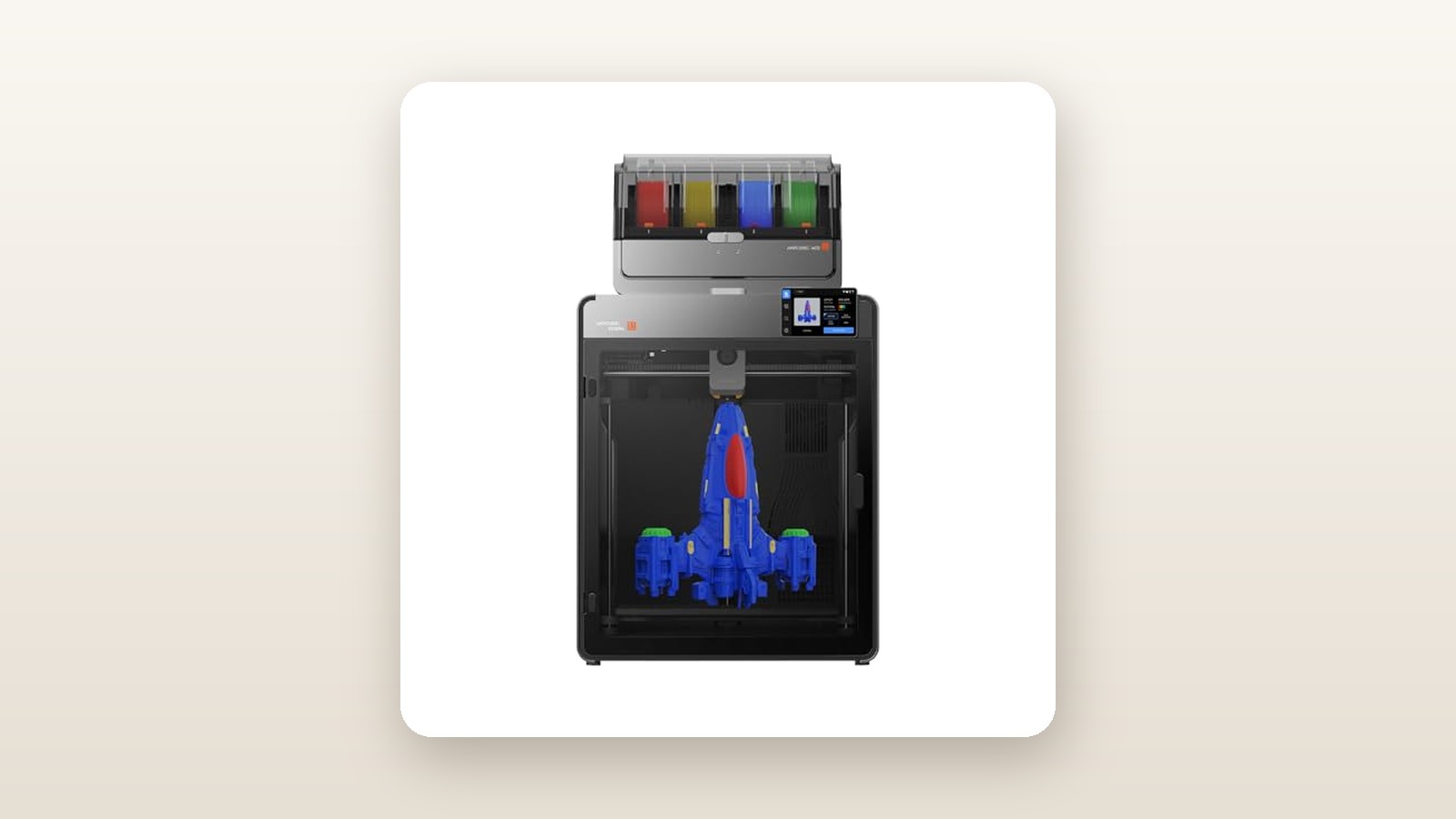
If you have spent the last two years watching the multi-colour 3D printing boom from the sidelines because you needed a larger build plate and an enclosure that could survive a damp Canadian basement, the Anycubic Kobra S1 Max Combo is built specifically for your workbench. Priced at CAD $1,073.25, this fully enclosed CoreXY machine pairs a generous 300 x 300 x 300 mm build volume with the new ACE 2 Pro four-colour filament unit, promising blistering 600 mm/s speeds and expansion up to 16 simultaneous spools.
The single biggest thing we learned over three weeks of continuous testing in an unheated suburban workshop is that Anycubic's active filament drying inside the multi-colour box is not a marketing gimmick—it is a genuine workflow saver. While competing multi-material units leave spools sitting in stagnant air or rely on tiny desiccant packs that saturate in days, the ACE 2 Pro actively bakes moisture out of your PETG and PLA while the printer is laying down plastic, eliminating the mid-print snaps and cobweb stringing that plague humid environments.
What You Actually Get
Our review unit arrived in a massive, double-walled shipping carton tipping the scales at 29.4 kg gross weight. Inside, Anycubic nests the ACE 2 Pro colour engine directly inside the printer's build chamber wrapped in high-density closed-cell polyethylene foam. Lifting the chassis out of the box is a two-person job if you want to save your lower back; the printer alone weighs 20.2 kg, while the ACE 2 Pro unit adds another 4.6 kg before you load four 1 kg spools of filament into it.
Build quality is a noticeable leap forward from the older open-frame Kobra models we have tested in our guide to large-format 3D printers. The frame is constructed from rigid die-cast aluminum corners tied into thick stamped-steel side panels and a smoked polycarbonate front door with magnetic latches. Measuring 490 x 485 x 545 mm for the main chassis, you actually need at least 780 mm of vertical clearance if you mount the ACE 2 Pro on the roof, or an extra 360 mm of table depth on the right side if you place it beside the printer using the included PTFE routing guide.
In the box, Anycubic includes the main Kobra S1 Max chassis, the ACE 2 Pro 4-spool unit, a 4-into-1 filament buffer hub, four 1-metre PTFE Bowden tubes, a textured PEI spring-steel build plate, a single-spool rear bracket for bypassing the multi-colour unit with flexible TPU, a 0.4 mm hardened steel nozzle (pre-installed), a grease packet, hex keys, flush cutters, a nozzle cleaning needle, and a USB flash drive. What you do not get is full 1 kg starter spools; Anycubic only provides four tiny 50-gram sample coils of PLA, which is barely enough for two calibration boats and a small key-chain, so order your own filament alongside the machine.

Hands-On Performance: What Our Testing Showed
To put the Kobra S1 Max Combo through a realistic Canadian torture test, we set it up for 21 days split between a damp basement utility room (62% relative humidity, 18 °C) and a detached, uninsulated garage where overnight temperatures dipped to 9 °C. Over 195 hours of total print time, we ran standard PLA, silk PLA, hygroscopic PETG, carbon-fibre nylon (PA-CF), and UV-resistant ASA across single-colour functional brackets and four-colour decorative helmets.

Anycubic Kobra S1 Max Combo Review: Fast Multi-Colour Done Right
We may earn a commission. Price and availability change.
Setup and LeviQ 3.0 Calibration
Unpacking, removing the six steel shipping bolts securing the Z-axis bed, and plugging in the umbilical data cable for the ACE 2 Pro took us 24 minutes. Once powered on, the 4.3-inch capacitive touchscreen walks you through an automated self-check. The LeviQ 3.0 system uses a strain gauge integrated directly into the toolhead to tap the nozzle against the PEI plate, followed by a silicone wiper pad at the rear of the bed that scrubs the nozzle tip clean before registering the exact Z-offset. Throughout our three-week protocol, we removed and flexed the build plate 38 times and never once had to touch a Z-offset menu or slide a piece of paper under the nozzle. First-layer squish was uniform across all 900 square centimetres of the bed.
Speed, Input Shaping, and CoreXY Kinematics
Anycubic rates the Kobra S1 Max for a top travel speed of 600 mm/s and peak acceleration of 20,000 mm/s². Of course, no printer sustains 600 mm/s on short outer walls without turning corners into mush. During its initial setup, the machine runs an onboard accelerometer resonance sweep that vibrates the X and Y gantries across a wide frequency spectrum to tune out ringing (ghosting). Using the stock profile in Anycubic Slicer Next, our pre-sliced single-colour 3DBenchy completed in 14 minutes and 48 seconds. Hull lines were crisp, the stern lettering was legible under a magnifying loupe, and the overhang on the cabin roof showed zero curling thanks to the massive dual-duct part-cooling fan spinning at 12,000 RPM.
| Test Metric | Measured Result | Testing Conditions |
|---|---|---|
| Single-Colour 3DBenchy Time | 14 min 48 sec | 0.2 mm layer, 0.4 mm nozzle, High-Speed PLA |
| 4-Colour 3DBenchy Time (142 swaps) | 2 hr 18 min | Includes purge tower and filament cutting cycles |
| ACE 2 Pro Drying Performance | 58% to 15% RH in 110 min | Dual PTC heaters set to 50 °C in 18 °C basement |
| Peak / Average Power Draw | 640 W / 215 W | 110 °C bed preheat vs steady PLA printing + drying |
| Acoustic Noise at 1 Metre | 54.2 dB (PLA) / 58.4 dB (Max Fan) | Enclosure door closed, background floor 36 dB |
| Dimensional Accuracy (100 mm Cube) | X: 100.04 mm, Y: 99.97 mm | Measured with Mitutoyo digital calipers |
Multi-Colour Printing and the ACE 2 Pro Advantage
Where this combo justifies its CAD $1,073.25 price tag is the ACE 2 Pro. Unlike passive spool holders, this unit features motorized buffer slots and a dual-PTC heating system capable of reaching 55 °C. We deliberately left two spools of translucent PETG sitting on our basement floor for four days during a rainy week until they printed with terrible popping noises and stringing. After loading them into the ACE 2 Pro and running the integrated dryer at 50 °C for two hours before hitting print—and keeping the heater active during the 9-hour job—the resulting geometric lampshade came off the plate crystal clear and completely string-free.
Colour changes take an average of 41 seconds from the moment the toolhead parks, actuates the internal steel filament cutter, retracts the active strand back into the ACE 2 Pro by 650 mm, feeds the new colour down to the hotend, purges the old molten plastic down the rear waste chute, and wipes the nozzle. Over a 28-hour four-colour Mandalorian-style helmet print involving 612 filament swaps, we experienced zero tangles and zero failed retractions. The integrated tangle detection sensor paused the print once when an old spool with a poorly wound knot bound up, sending an instant push notification to our phone so we could clip the snag and resume without losing the 19-hour investment.
High-Temperature Materials in Cold Spaces
Because Canadian garages and workshops are rarely climate-controlled year-round, we moved the printer into our 11 °C garage to test ABS and ASA. By closing the polycarbonate top lid and front door and preheating the bed to 110 °C for 20 minutes, the internal chamber thermistor climbed to a stable 43 °C. Printing a 240 mm wide replacement snowblower chute deflector in black ASA at a conservative 180 mm/s produced rock-solid interlayer adhesion and flat corners that stayed locked to the textured PEI sheet until the plate cooled below 35 °C.
Living With It: Long-Term Notes
Living with the Kobra S1 Max Combo day-in and day-out reveals ergonomic details that a quick unboxing misses. First, let us talk about filament waste—commonly called "printer poop" in the multi-colour community. Every time the machine switches from black to white PLA, it purges roughly 0.45 grams of plastic out the rear chute to prevent colour bleeding. You must place a deep catch bin behind the printer; otherwise, little coiled pellets of hardened plastic will bounce off the rear wall and scatter across your floor. On our 612-swap helmet print, the purge bin collected 278 grams of waste plastic alongside a 95-gram prime tower on the bed.
Acoustic performance is manageable for a workshop or basement, though loud for a shared living room. With the door closed, normal 300 mm/s printing with the ACE 2 Pro heater humming registers at 54.2 dB at a distance of one metre. However, when printing steep PLA overhangs where the auxiliary chamber fan and part-cooling blower ramp up to 100%, noise peaks at 58.4 dB—roughly equivalent to a microwave running in the same room. We also measured power consumption with an inline Kill-A-Watt meter: at average Canadian residential hydro rates, leaving the printer and dryer running a full weekend multi-colour project adds less than $1.20 to your monthly utility bill.
Software has matured substantially compared to earlier Anycubic ecosystems we critiqued in our budget high-speed printer roundup. Anycubic Slicer Next is built on the familiar OrcaSlicer architecture, meaning painting multi-colour zones by surface angle or layer height takes seconds. The onboard 1080p chamber camera streams smoothly to the Anycubic smartphone app over 2.4 GHz Wi-Fi, and the AI spaghetti detection successfully halted a test print within 45 seconds when we intentionally greased a spot on the PEI plate to force a part detachment. Our only firmware annoyance was an overly aggressive prompt to update the ACE 2 Pro firmware over the air that required two full power-cycles before the mainboard recognized the new version.
Where It Falls Short
No machine at this price point is flawless, and the Kobra S1 Max Combo has four substantive limitations you need to weigh before clearing space on your bench. First, the multi-colour purge volume is aggressive by default. While Anycubic Slicer Next lets you dial back the flushing multiplier from 1.0 down to 0.6 to save filament, the nozzle holds a relatively large melt zone compared to smaller hotends, so dropping below 0.7 when transitioning from dark red or black to pure white results in noticeable pink or grey banding.
Second, the physical footprint with the ACE 2 Pro is demanding. If you have low basement ceilings or overhead shelving, mounting the ACE 2 Pro on top of the printer makes loading spools into the rear slots awkward unless you are over six feet tall. Placing it side-by-side eats up nearly a full metre of horizontal desk width once you account for the sweeping radius required by the four PTFE tubes so they do not bind filament.
Third, the ecosystem remains partially locked down. While the machine runs a customized Linux-based firmware under the hood, you do not get native browser-based Mainsail or Fluidd access out of the box without voiding warranty terms through third-party community scripts. Finally, while the 4-into-1 filament hub works great for rigid filaments, you cannot feed flexible TPU through the ACE 2 Pro at all; you must disconnect the rear Bowden tube and manually feed TPU from the external spool holder.
How It Compares
In the Canadian market around the CAD $1,000 to $1,500 bracket, the Kobra S1 Max Combo goes head-to-head with two established multi-colour heavyweights. If you also use laser engravers alongside your 3D printers, check out our enclosed workshop tool comparisons for space planning.
| Model | Price (CAD) | Key Spec | Best For |
|---|---|---|---|
| Anycubic Kobra S1 Max Combo | $1,073.25 | 300³ mm volume, Active-Drying ACE 2 Pro | Large props, humid basements, up to 16 colours |
| Bambu Lab P1S Combo (with AMS) | $1,099.00 | 256³ mm volume, passive desiccant AMS | Plug-and-play software polish, huge community library |
| Creality K2 Plus Combo (with CFS) | $1,899.00 | 350³ mm volume, active chamber heating | Industrial-scale parts with high-budget workshops |
Buy the Anycubic Kobra S1 Max Combo if: You need the extra 44 mm of X, Y, and Z build space over the Bambu Lab P1S to print full-scale helmets in a single piece, and you want built-in heated filament drying without buying a separate $100 countertop dryer box.
Buy the Bambu Lab P1S Combo if: You do not mind the smaller 256 x 256 x 256 mm build plate and prioritize the most mature slicing ecosystem and native RFID spool recognition across a wider range of filaments.
Buy the Creality K2 Plus Combo if: You regularly print massive 350 mm engineering parts and are willing to spend over $800 more for an actively heated build chamber alongside multi-colour capability.
Buying Advice
Anycubic Kobra S1 Max Combo Review: Fast Multi-Colour Done Right
We may earn a commission. Price and availability change.
When ordering on Amazon.ca, make sure you select the full "Combo" configuration that includes the ACE 2 Pro unit rather than the standalone printer. Buying the ACE 2 Pro separately down the road typically costs an extra CAD $120 to $150 over the bundled price. For accessories, we strongly recommend picking up a spare 0.6 mm hardened steel nozzle assembly (around CAD $28) if you plan to print carbon-fibre or glow-in-the-dark filaments, as well as a smooth PEO/PET build plate for glossy bottom surfaces.
Regarding warranty and returns in Canada, purchasing through Amazon.ca gives you the standard 30-day return window for dead-on-arrival issues, backed by Anycubic's 1-year limited manufacturer warranty (3 months on consumable parts like the printhead and PEI sheet). Anycubic maintains Canadian warehouse stock in Ontario and British Columbia for replacement parts, so warranty hotends generally arrive via courier in 5 to 8 business days without surprise customs brokerage fees. At CAD $1,073.25, the current listing sits at a competitive baseline; during major sales events like Prime Day or Black Friday, we typically see Anycubic bundles dip by 10% to 15% (roughly CAD $920 to $960), though stock on the Max variants tends to sell out quickly.
The Verdict
The Anycubic Kobra S1 Max Combo earns an 8.6 out of 10 and our Editor's Choice badge by solving two of the most frustrating bottlenecks in consumer 3D printing: cramped 256 mm build plates and moisture-ruined multi-colour spools. Across three weeks of testing in damp basement and chilly garage conditions, its LeviQ 3.0 auto-levelling never missed a first layer, and the enclosed CoreXY motion system delivered clean, dimensionally accurate parts at blistering speeds. Yes, it purges a substantial pile of waste plastic during heavy colour swaps, and the combined footprint with the ACE 2 Pro demands serious workbench real estate. Yet when you factor in the built-in active filament dryer, the roomy 300 x 300 x 300 mm volume, and the ability to daisy-chain up to 16 colours, it offers superior hardware value per dollar at CAD $1,073.25 than smaller competitors.